Bringing your existing quotes into Ascora doesn’t have to be a time-consuming process. The Quote Import Template allows for a seamless transition, ensuring that historical quotes and their associated details are accurately reflected within the system.
By following this guide, you can:
✔ Efficiently migrate bulk quote data from another software or spreadsheet-based system.
✔ Ensure data consistency by adhering to Ascora’s structured import format.
✔ Import quotes along with supply and labor details, keeping cost and pricing information intact.
✔ Customize quote attributes, such as pricing methods, status tracking, and assigned users.
✔ Minimize manual data entry, reducing errors and increasing efficiency.
Whether you're setting up Ascora for the first time or updating your existing database, this process ensures that your quotes are imported accurately, allowing you to manage estimates, job conversions, and client communications with ease.
Import Process
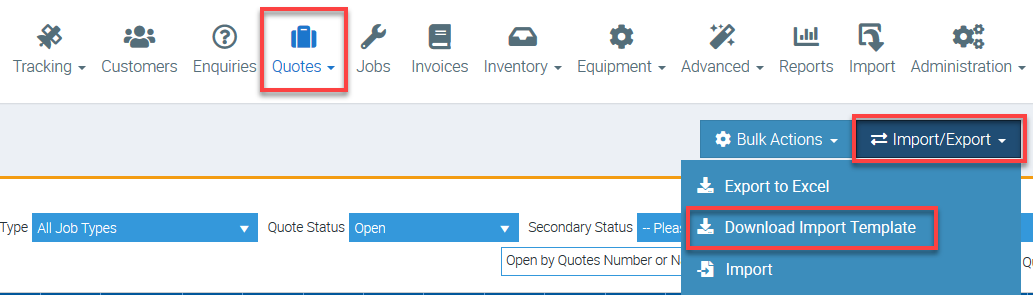
1. Go to Quotes → Import/export → Download Import Template.
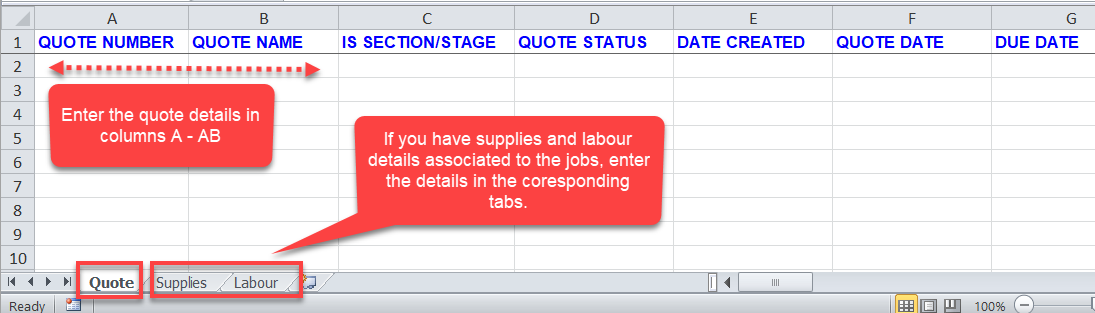
2. Enter the information in the Excel template.
If you have supply information associated to jobs, go to Supply tab and enter the information from there. Do the same for labour details by entering them in the Labour tab.
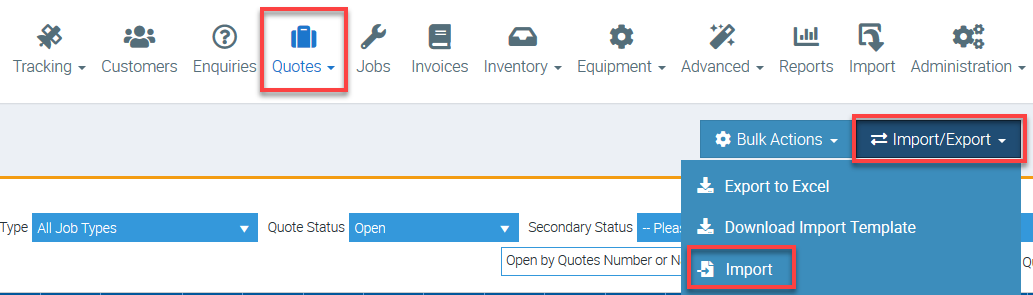
3. After completing the necessary details, go back to Quotes → Import/Export but this time, click Import.
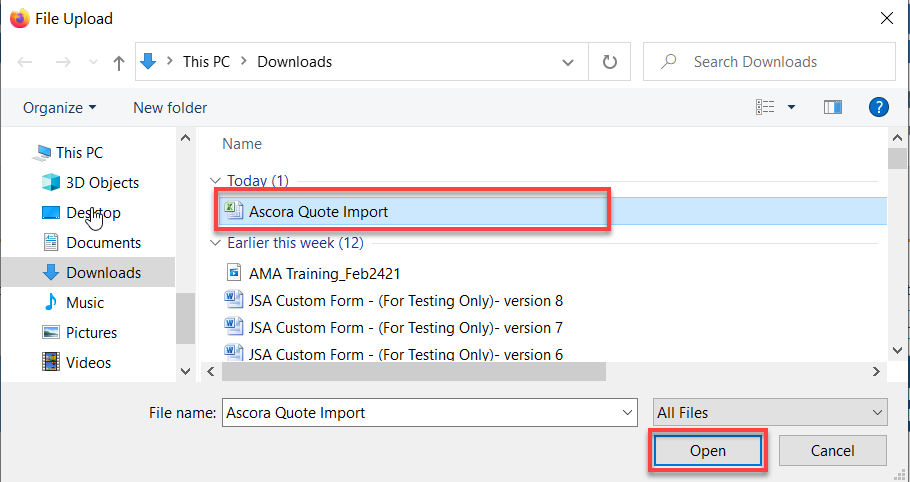
4. Select your Import file and click Open.
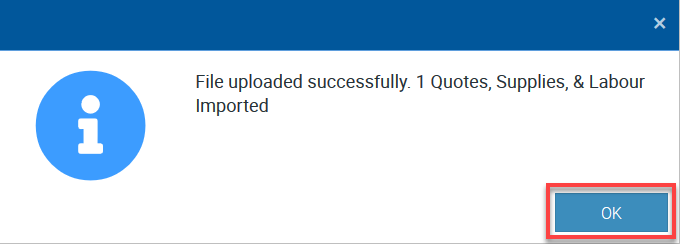
5. Once the data is already imported, you would see a notification similar to the below.
Template Guide
| Column | Header/Column Name | Compulsory Field | Default Value If Not Specified | Possible Values (If Applicable) | Create If Not In Ascora | Notes |
|---|---|---|---|---|---|---|
| A | QUOTE NUMBER | Next Available Quote Number | ||||
| B | QUOTE NAME | |||||
| C | IS SECTION/STAGE | False | Yes/No | Set to Yes/True for any Quote that is a child of another. E.g. a section or stage of another Quote. The parent Quote should always be set to False. | ||
| D | QUOTE STATUS | In Progress | See Table Below | |||
| E | DATE CREATED | Current Date | ||||
| F | QUOTE DATE | Current Date | ||||
| G | DUE DATE | |||||
| H | VALID UNTIL DATE | |||||
| I | SITE CUSTOMER | For Section/Stage - No Otherwise - Yes | For Section/Stage - Parent Quote Site Customer | Yes | If Billing Customer has been provided but not Site Customer, the Billing Customer will be used for both. | |
| J | SITE CONTACT | Yes | ||||
| K | BILLING CUSTOMER | Site Customer | Yes | |||
| L | BILLING CONTACT | Yes | ||||
| M | ADDRESS LINE 1 | |||||
| N | ADDRESS LINE 2 | |||||
| O | SUBURB | |||||
| P | STATE | |||||
| Q | POSTCODE | |||||
| R | PRICING METHOD | Default Setting | See Table Below | |||
| S | TOTAL AMOUNT EX TAX | $0 | If Pricing Method is Time & Materials, the Total values will be recalculated based on Supplies and Labour values after import process has completed | |||
| T | TOTAL TAX | $0 | As Above. | |||
| U | QUOTE DESCRIPTION | |||||
| V | PURCHASE ORDER | |||||
| W | CLIENT ORDER NUMBER | |||||
| X | JOB TYPE | Default Setting | Yes | |||
| Y | ASSIGNED TO | |||||
| Z | BOOKING DATE | If a Assigned To and a Booking Date has been imported, a new Booking will be created with these details. If either are missing, no Booking will be created. | ||||
| AA | TEAM | |||||
| AB | VARIATION FOR JOB NUMBER | If populated, the Quote will be created as a Variation for the given Job. The Job must already exist in Ascora for the link to be created, otherwise the Quote will be imported as a standard Quote. |
Quote Status
When importing Quote data, the mapping table below can be used to ensure the Quote is imported as the expected Status.
| In Progress | In Progress, Started, Open |
|---|---|
| Sent To Client | Sent To Client, Sent |
| Won | Converted To Job, Won, Converted, Completed, Accepted |
| Lost | Lost, Rejected, Declined |
| Cancelled | Cancelled |
Pricing Method
| Time and Materials | Time and Materials, Time and Material, Time, T&M |
|---|---|
| Fixed Price | Fixed Price, Fixed, FP |
| Sections | Sections, Section |
| Stages | Stages, Stage |
Got a question?
Submit an Idea 💡 Go to Ideas Portal