The Credit Notes section in the Administration → Accounting area allows you to create credit notes to adjust or correct customer invoices. Credit notes are essential for managing refunds, discounts, or other adjustments and help maintain accurate financial records.
How to Create a Credit Note
- Access the Credit Notes Section
Navigate to Administration → Accounting → Credit Notes in Ascora.
- Create a New Credit Note
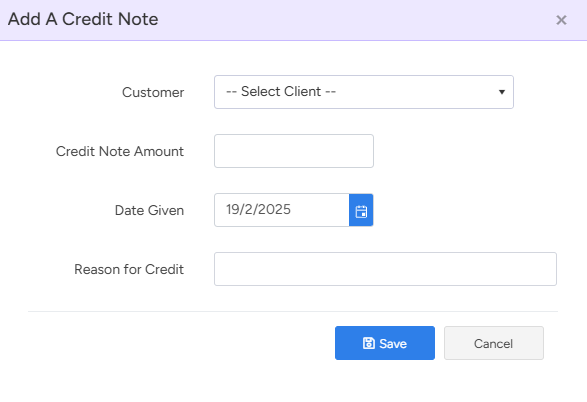
Click the + Create Credit Note button to open the credit note creation form.
- Select the Customer
From the drop-down list, choose the customer for whom you are issuing the credit note.
- Enter Credit Note Details
- Credit Note Amount: Input the amount to be credited.
- Date: Select the appropriate date for the credit note.
- Reason for Creation: Provide a brief explanation for the credit note (e.g., overpayment, discount adjustment, error correction).
- Save the Credit Note
After verifying all details, click Save to finalize and record the credit note.
Got a question?
Submit an Idea 💡 Go to Ideas Portal