Keeping track of customer enquiries is essential for maintaining an organized sales pipeline and providing timely responses. Ascora’s Enquiries List allows you to efficiently manage, search, and filter your enquiries, ensuring no lead or customer request goes unnoticed.
This guide will walk you through how to view, search, and filter existing enquiries, enabling you to quickly find relevant information, update enquiry details, and take the necessary next steps—whether that’s following up, converting an enquiry into a quote or job, or assigning it to the right team member.
By using Ascora’s search and filtering tools, you can streamline your workflow, reduce response times, and improve your overall customer management process.
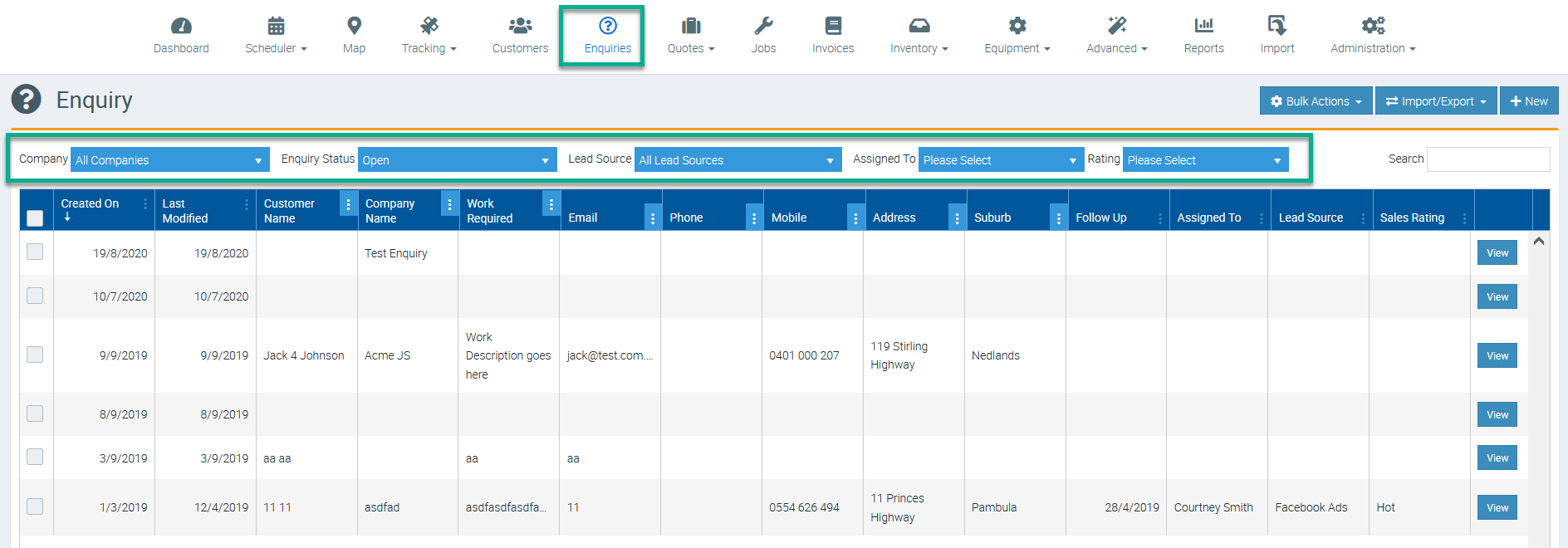
Choose the Enquiries Icon in the Top Menu to display the Enquiries List.

View an Existing Enquiry
In the Enquiries List Screen, click the View button located beside the Enquiry to view and/or edit that Enquiry’s details.

Filter the Enquiries List
Narrow your search by filtering the Enquiries List by Company, Enquiry Status, Lead Source, the Assigned User and/or the Enquiry Rating.
Search Using the Global Search Box
You can enter any Enquiry related information into the Search box and the Enquiries List will refine as you type. For example, if you know the person is located in Fremantle, as you type “Fre” the Enquiries List will refine to only show Enquiries whose details include “Fre”.

Got a question?
Submit an Idea 💡 Go to Ideas Portal