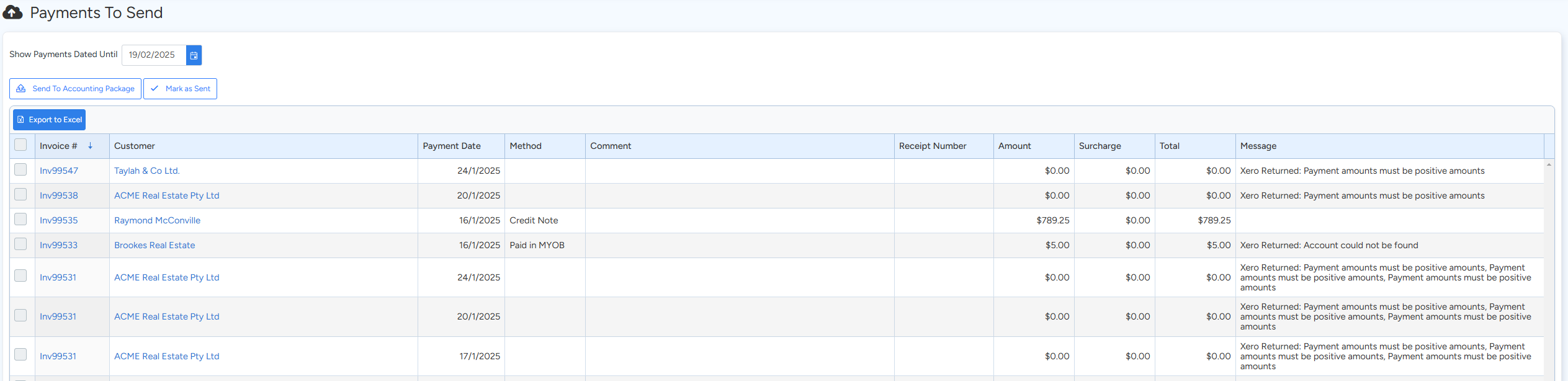
The Payments to Send section is where you can review all pending payments that are scheduled to be sent to your accounting package. This page allows you to:
- Filter Payments by Date: Select a cutoff date to display all payments recorded up to that date.
- Send Payments: Initiate the transfer of these payments to your connected accounting package.
- Mark as Sent: Once the payments are successfully transmitted, mark them as sent so they aren’t processed again.
How to Use the Payments to Send Section:
- Review Pending Payments:
On this page, you’ll see a list of payments along with their corresponding dates. Use the date filter to narrow down the list to the payments you want to process.
- Send Payments to Accounting:
When you’re ready, initiate the sending process to transfer the payments to your accounting package. This ensures your financial records are updated accurately.
- Mark Payments as Sent:
After the transfer, mark the payments as sent to prevent duplicate entries. This step is crucial for maintaining clear and accurate accounting records.
Got a question?
Submit an Idea 💡 Go to Ideas Portal