The Ascora iOS app allows users to easily manage unscheduled jobs, ensuring that work is accurately tracked even when it's not pre-booked in the system. By accessing the My Unscheduled Jobs section, you can quickly find, check in, and check out of jobs as needed, ensuring accurate timesheet recording and job tracking.
This feature is particularly useful for last-minute callouts, follow-ups, or jobs that were not scheduled through the web platform. Follow the steps below to efficiently manage unscheduled jobs using the Ascora iOS app.
1. Log in to the Mobile App by entering your User email address and assigned Pin Code and tap on the Filter icon on the upper right.
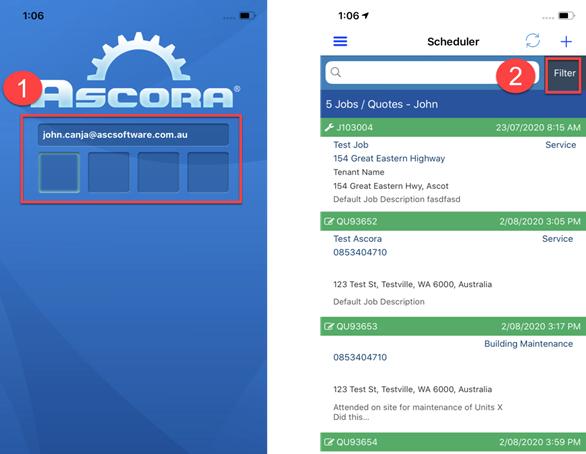
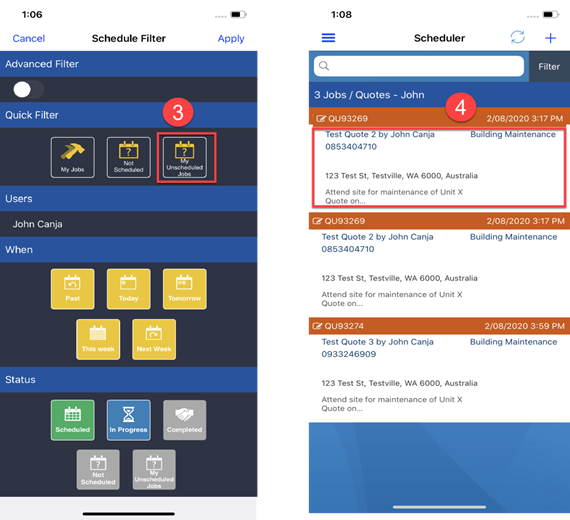
2. Tap on My Unscheduled Jobs and choose from the list and tap it to show more details.
3. In the Details screen, scroll down to see the Check In To check in, simply tap it and it will automatically change to a Check Out button for you to check out after completing the job.
Got a question?
Submit an Idea 💡 Go to Ideas Portal