Section Based Jobs are perfect for larger, multi-stage projects, allowing you to break down work into distinct sections while keeping everything tied to a single parent job. Each section functions as its own job card, giving you the flexibility to track labor, supplies, and payments at a granular level.
📽 Watch the video guide ⤵
Below is an overview of how to set up and manage Section Based Jobs in Ascora.
Create a Parent Job
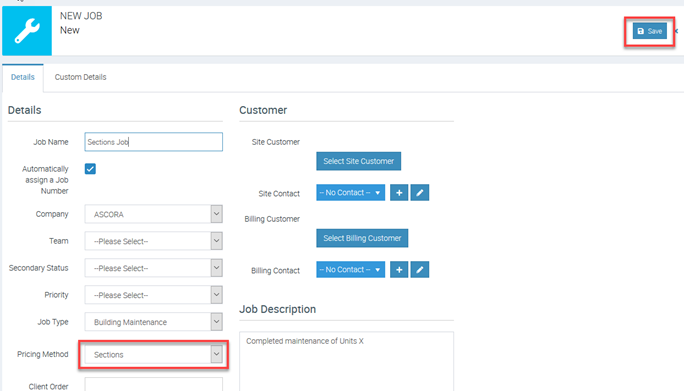
- Start a new job from the Jobs Screen, a Customer Card, or the Scheduler.
- Under Pricing Method, select Sections and click Save.
Add and Name Sections
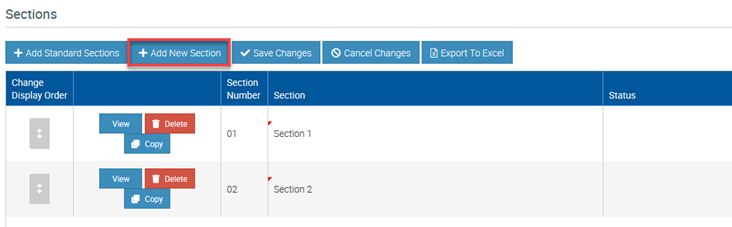
- Scroll down to the Sections area and click +Add New Section.
- Assign meaningful names to each section (e.g., “Demolition,” “Framing,” “Electrical”) and save your changes.
Add Section Details
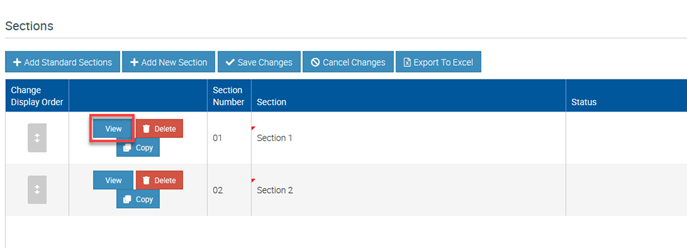
- Each section opens in its own job card.
- Enter pricing details (Time and Materials or Fixed Price) and add labor, supplies, callout fees, or other charges as needed.
- Note: You cannot create a section-based job within another section.
Note: You can also add Standard Sections and you can set this up in Administration -> Jobs -> Add New in Sections area.
Schedule Each Section Separately
By breaking down multi-phase projects into sections, you maintain a clear overview of costs, labor, and scheduling for each stage of the work. This structured approach not only simplifies billing and reporting but also ensures you never lose sight of your overall project scope.
To access a tutorial video about Sections and Stages, you can click the link below:
https://www.ascora.com.au/TrainingVideos/VideoViewer/Admin-Jobs-SectionsandStages
Got a question?
Submit an Idea 💡 Go to Ideas Portal