The Scheduler feature in the Ascora Android app allows users with full access permissions to efficiently manage job bookings. This includes moving jobs between users, adjusting booking times, and modifying the duration of bookings directly from your mobile device. This functionality ensures seamless job management while on the go, keeping schedules accurate and up-to-date.
Changes made in the mobile app will automatically sync with the Ascora web platform, ensuring consistency across devices. If you don't see the updates immediately, a quick manual sync can refresh the schedule view. Follow the steps below to access and manage job bookings using the Scheduler in the Ascora Android app.
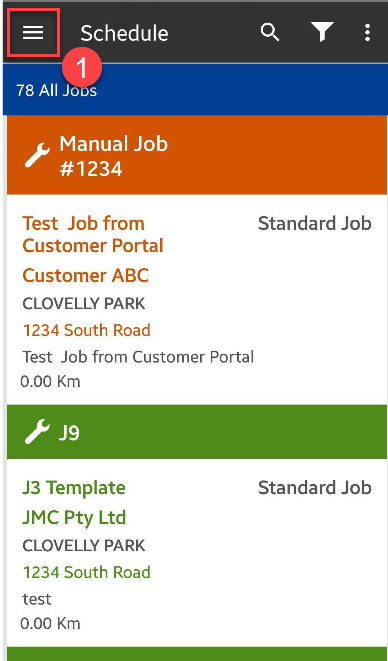
1. Tap on the Menu icon located on the upper left part of the screen.
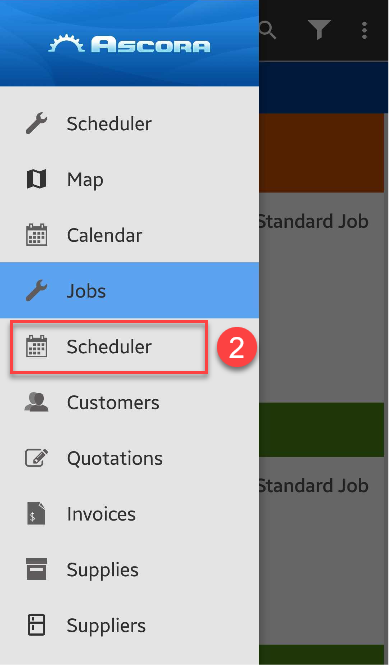
2. Tap on Scheduler which is the one with the Calendar icon beside it.
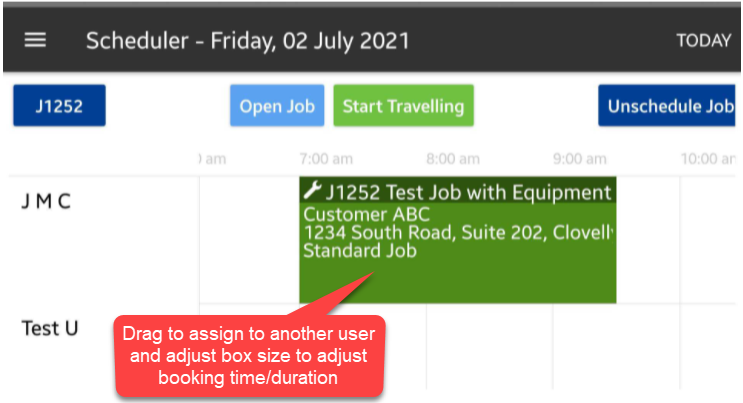
3. Locate the job booking (indicated by boxes with job details) and you can drag it to another user to move the booking.
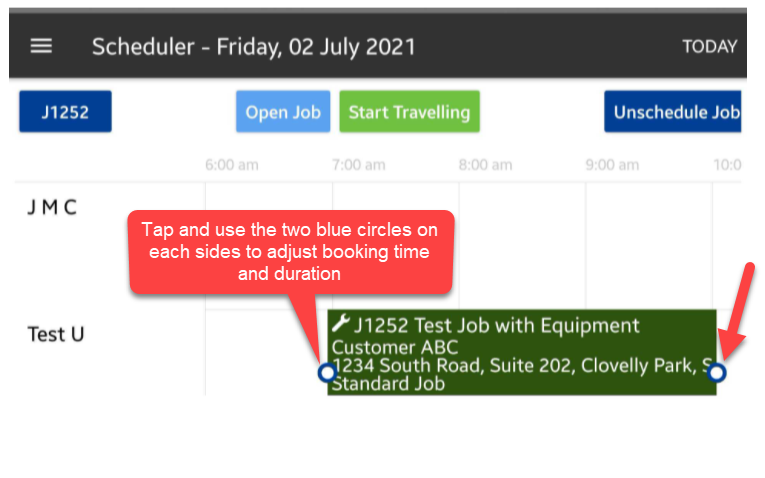
4. You can also tap on the box and use the blue circles on each sides of the box to adjust booking time and duration.
In this example, we moved job J1252 from user J M C to Test User and also increased the booking duration from 7:00am - 9:30am to 7:00am - 10:00am.
Got a question?
Submit an Idea 💡 Go to Ideas Portal