Easily add Callout Fees on the go with the Ascora Android app. Whether you’re working on a job or preparing a quote, this feature ensures accurate billing for emergency or after-hours services. Follow the steps below to quickly apply the appropriate Callout Fee, keeping your invoicing accurate and hassle-free.
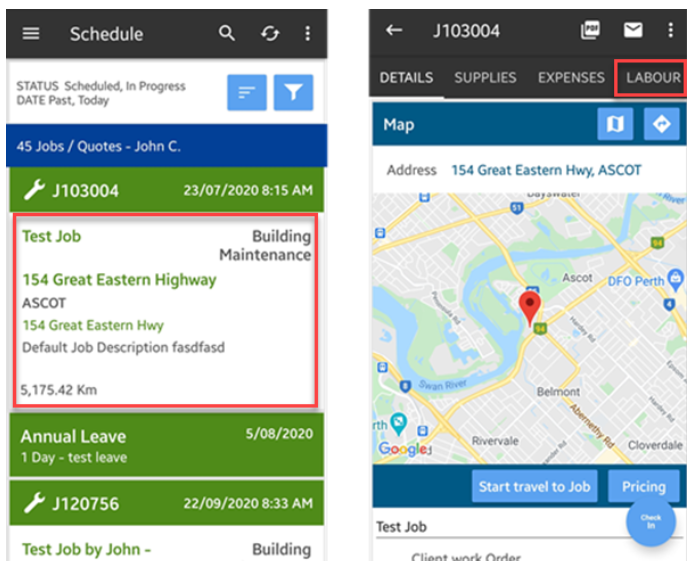
1. From the main screen, search for the job and tap it to access the Details screen and tap on Labour.
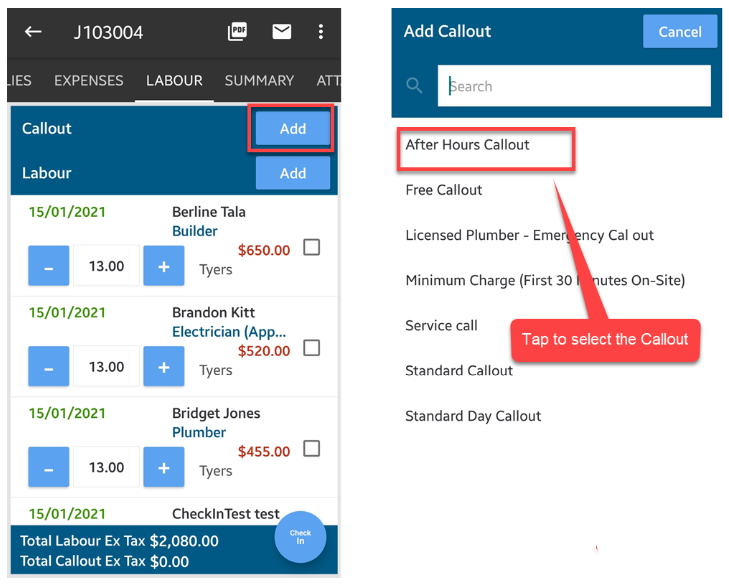
2. Tap Add beside Callout and select from the list by tapping the corresponding item.
In this example, we're adding After Hours Callout to this job.
Note: To add a Callout Fee to a quote from your Android Mobile App, simply open the quote details screen and tap Labour. The rest of the steps are similar to how we add it to a job.
Got a question?
Submit an Idea 💡 Go to Ideas Portal