Depending on the industry or type of business you run, you may use different terms across various areas of your operations. For example, you might refer to your customers as clients, your quotes as estimates, or your supplies as materials. Ascora’s Translations feature allows you to easily customize these terms to suit your business language, ensuring consistency across the platform. Additionally, you can hide any irrelevant fields to simplify your workflow and tailor the system to your specific needs. This flexibility helps you create a more intuitive and personalized experience as you manage your business with Ascora.
📽 Watch the video guide ⤵
1. Go to Administration → Translations and start from the General tab.
In this example, we use the term Client instead of Customer and thus we put Client in the corresponding field.
We also want to hide the Client Order Number and Purchase Order Number by ticking the corresponding boxes.

2. Scroll down and set your Translations for any of the following areas if also applicable.
- Address Fields
- Customer Fields
- Equipment
- Supplies
- Enquiries
- Inclusion and Exclusion
- Users
- Timesheets
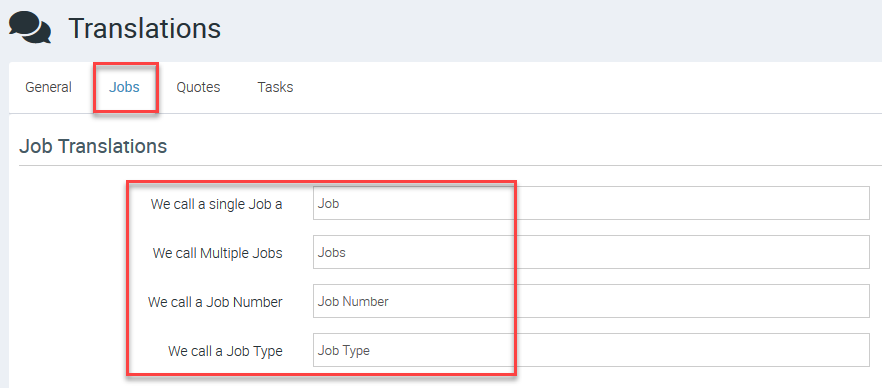
3. Access Jobs tab and set your translations if applicable.
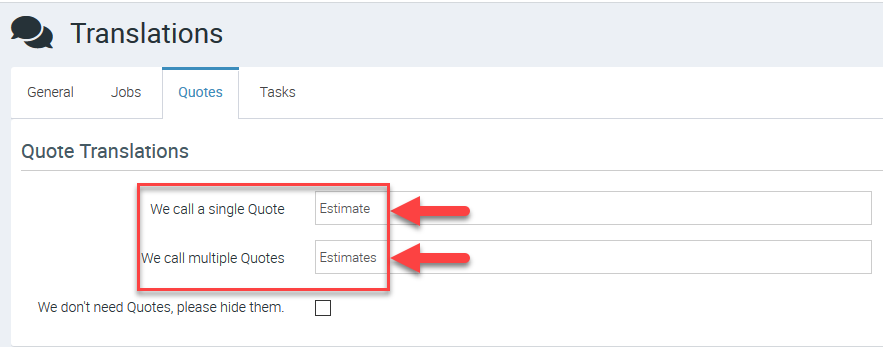
4. Access Quotes tab and in this example, we use the term Estimate instead of Quote.
5. Access Tasks tab and set your translations if applicable.

⚠ Note: The translations that you set will flow through different fields in Ascora where such terms are used.
Got a question?
Submit an Idea 💡 Go to Ideas Portal