The Ascora Android app allows you to easily add labour charges directly from your mobile device, ensuring that job costing is accurate and up to date. Whether you're working on a job or preparing a quote, the app lets you assign labour roles, track time, and manage costs efficiently.
This guide walks you through the simple steps to add labour charges, helping you keep your records organized and ensuring that billing aligns with the work completed.
📽 Watch the video guide ⤵
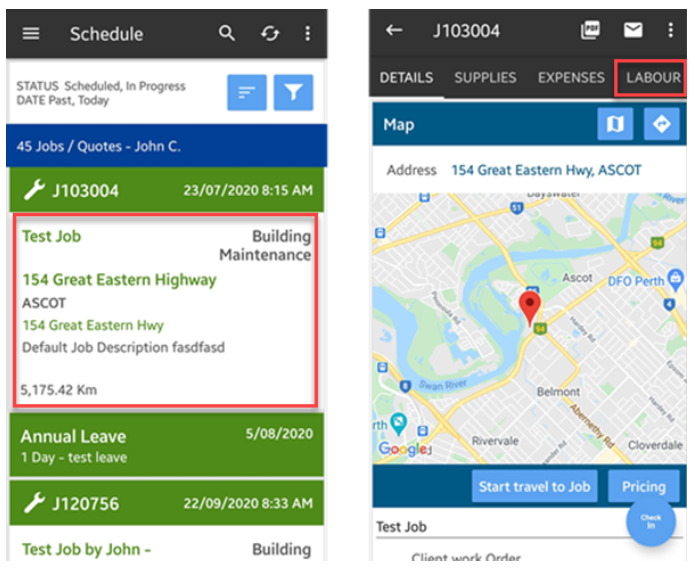
1. From the main screen, search for the job and tap it to access the Details screen and tap on Labour.
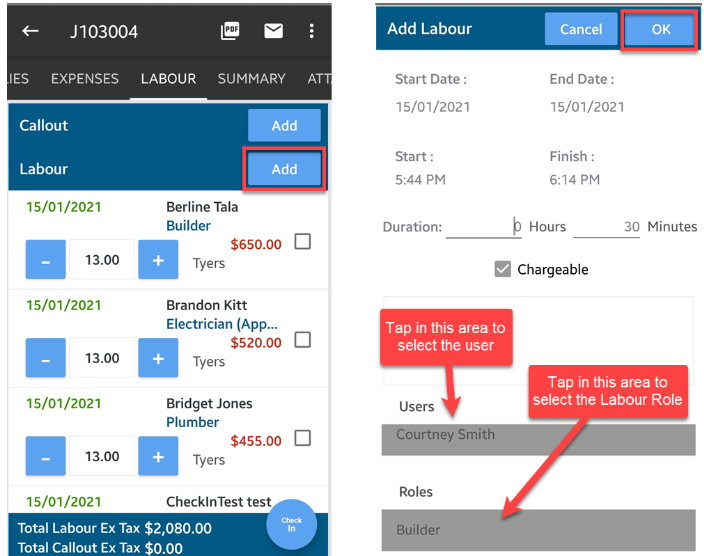
2. Tap Add beside Labour and select the user as well as Labour Role.
In this example, we've added Builder Role to user Courtney.
Note: To add labour charges to a quote from your Android App, simply access the quote details screen and the rest of the steps are the same.
Got a question?
Submit an Idea 💡 Go to Ideas Portal