Efficiently tracking labour costs is essential for accurate job costing and resource management. Ascora provides the flexibility to capture and manage Non-Chargeable Labour, allowing you to account for internal time spent on tasks that do not need to be billed to the customer. Whether you are setting up a specific non-chargeable labour role or updating existing roles, this feature ensures that labour entries are properly categorized while maintaining clarity in your job costing and invoicing processes.
This guide will walk you through the steps to:
- Create or update non-chargeable labour roles.
- Assign non-chargeable roles to users.
- Ensure accurate tracking of non-chargeable hours without affecting customer invoices.
- Customize role names and rates for easy identification and reporting.
By leveraging Ascora’s tools for managing non-chargeable labour, you can maintain precise control over your project costs while providing transparency for internal tasks. Follow the detailed steps below to set up and manage non-chargeable labour roles seamlessly.
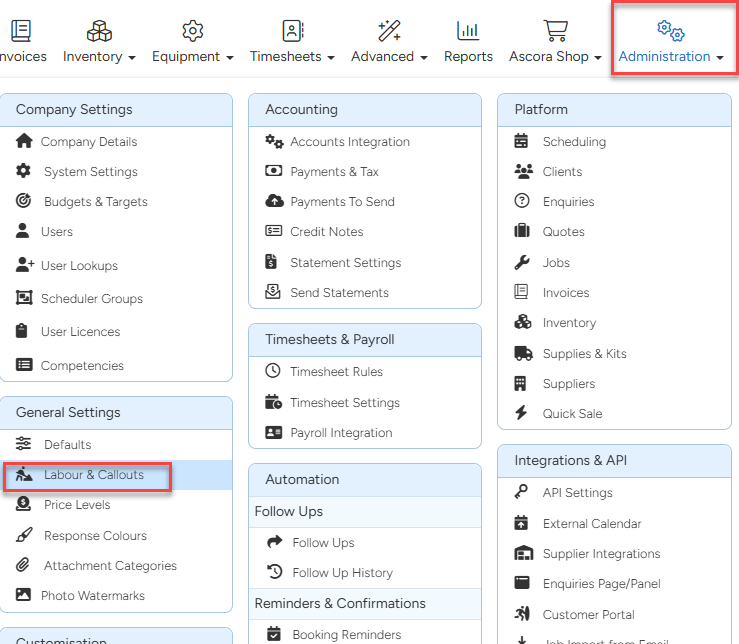
- Go to Administration → Labour & Callouts to manage existing roles or create new ones.
Edit or Add a Labour Role
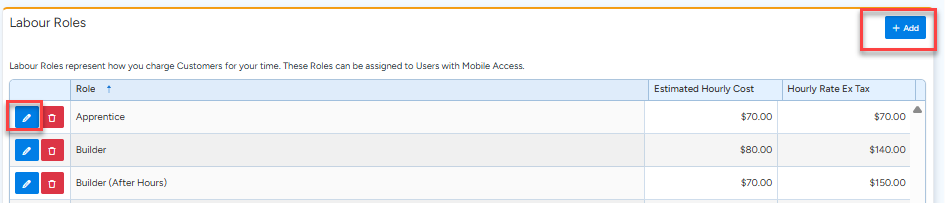
- Locate the relevant labour role in the list and click Edit to modify it, or click Add to create a new role.
- Ensure the role is easily identifiable by using a descriptive name, such as "Builder - Non-Chargeable Labour."
Mark the Role as Non-Chargeable
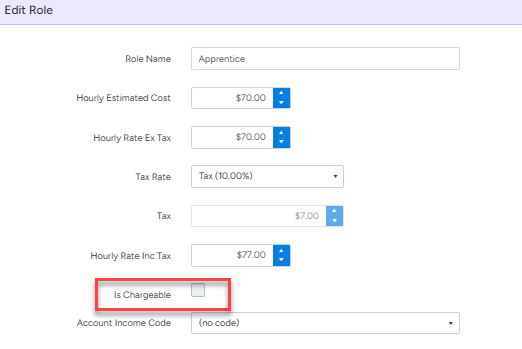
- In the role settings, untick the box beside Is Chargeable to ensure that hours logged under this role will not be billed to customers.
- Set the charge to $0.00, if preferred, for clear internal reference.
- Click the Save button to finalize the changes.
Assign the Role to Users
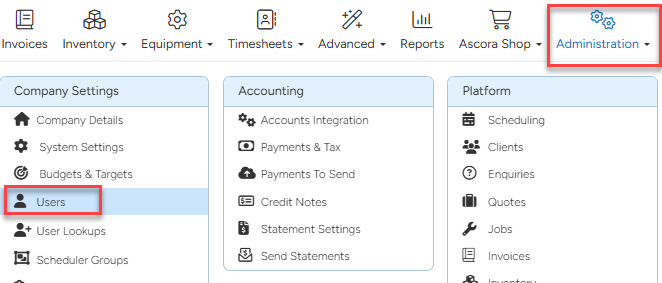
- Go to Administration → Users to manage user-specific settings.
Update User Settings
- Locate the user from the list and click View beside their name.

- Select the non-chargeable labour role in the Standard Labour Role field to ensure it is automatically applied when the user logs hours.
- Click Save to apply the changes.

Track Non-Chargeable Hours
- When users add timesheet hours, the Chargeable column will display N for non-chargeable entries, ensuring no amounts are included in customer invoices.
- Labour costs will still be tracked internally, allowing you to monitor overall project costs accurately.

Automate Non-Chargeable Labour Tracking
- When users check in and out of jobs using the Ascora app, the system will automatically tag their timesheet hours as non-chargeable based on the assigned labour role.
- Labour rates will still be recorded for internal purposes, providing transparency in cost management.
Additional Notes:
- Renaming roles or adding zero-dollar charges can make job costing reports easier to interpret.
- Non-chargeable roles are especially useful for tasks like internal reviews, training, or rework that aren't billable but contribute to accurate project tracking.
Got a question?
Submit an Idea 💡 Go to Ideas Portal