Understanding how supplies impact job profitability is crucial for maintaining accurate cost control, optimizing margins, and improving financial forecasting. In Ascora, supply costs are categorized into Budgeted, Committed, and Actual values, giving you a real-time snapshot of job profitability at any stage.
By tracking supplies through purchase orders, supplier invoices, and recorded usage, you gain full visibility into where costs are allocated and prevent unexpected budget overruns. Whether you're managing a simple job or a large-scale project, these insights help you maintain accurate pricing, streamline supplier management, and enhance decision-making for future jobs.
This guide walks you through how Ascora classifies supply costs, how they impact job profitability, and how to use this data to improve efficiency and profitability in your business.
Job Profitability
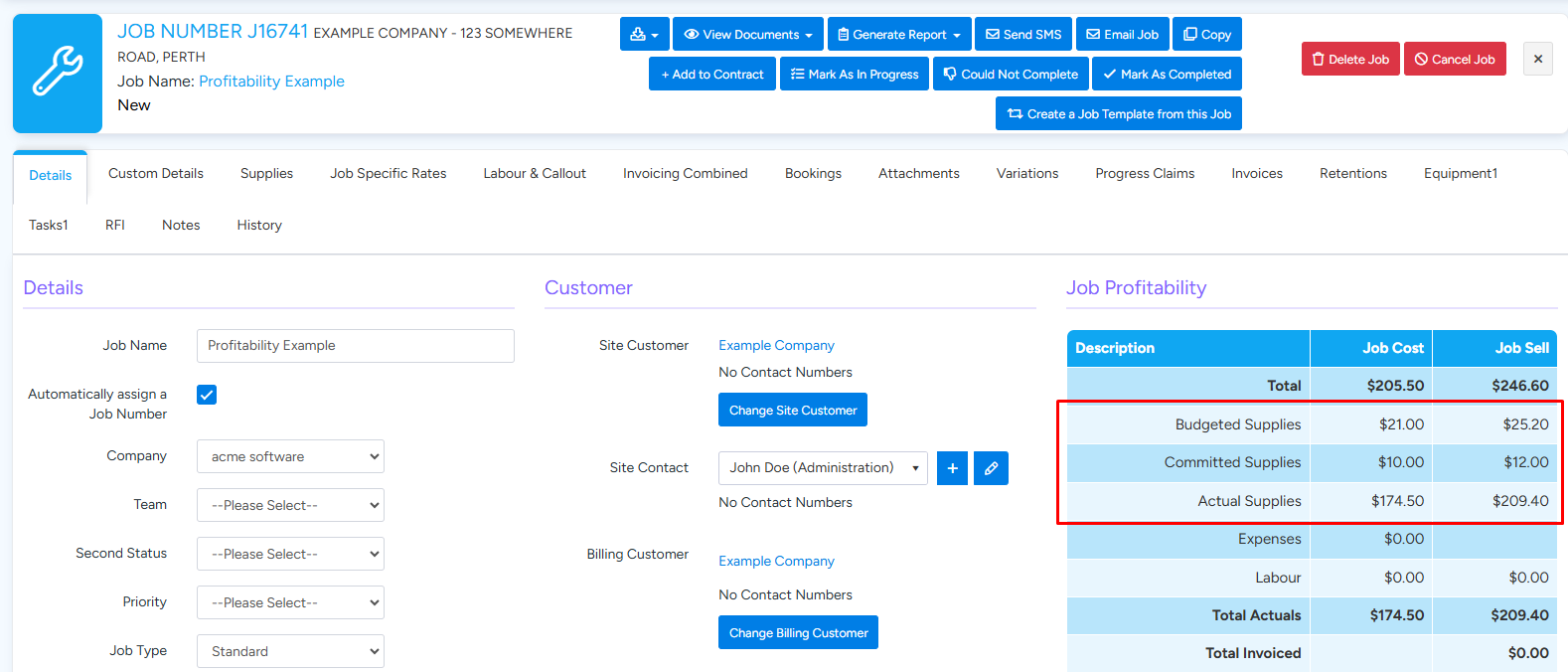
The Job Profitability breakdown is displayed in the main Details tab of a Job. Supply costs and sell amounts are distributed into three categories: Budget, Committed and Actual. The below image shows the Job Profitability for an example Job which will be used to demonstrate how the values are derived.
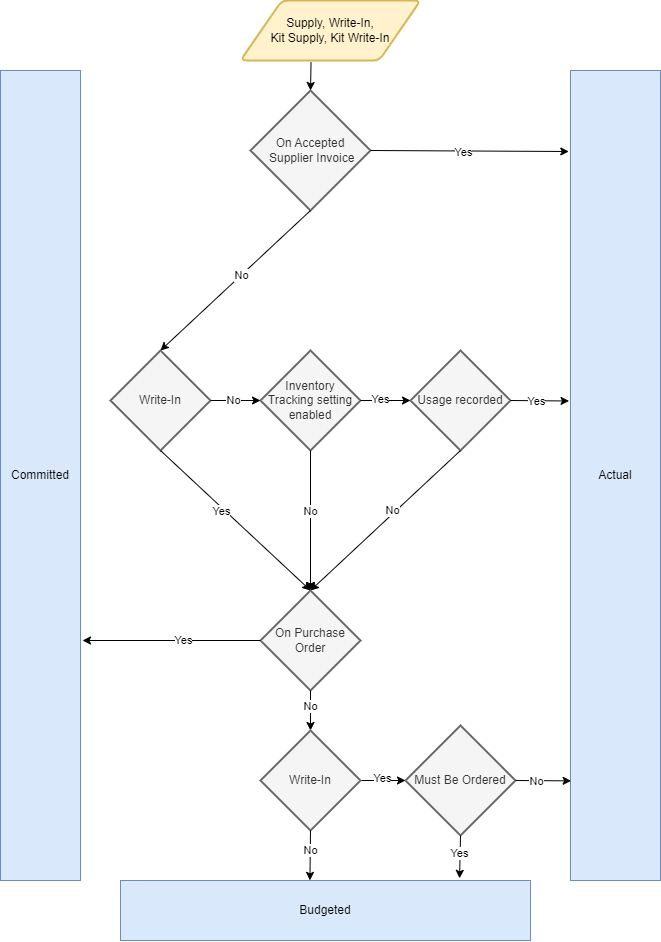
Flowchart
Example Job Breakdown
The below images show the 6 supplies that make up the example job, as well as the Purchase Orders and Supplier Invoices.
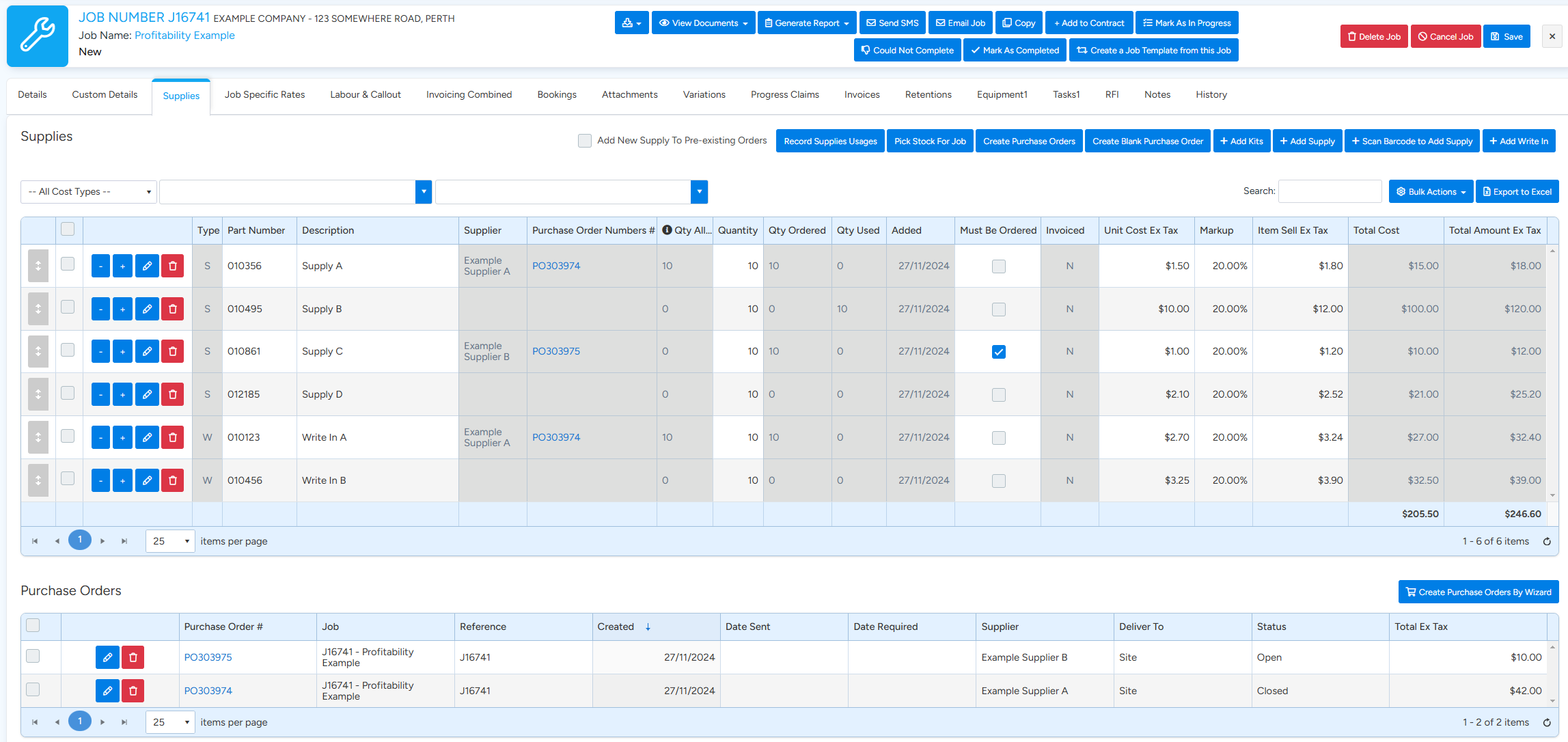

The table below describes how each supply’s cost is categorized. The example is intended to be straightforward and so does not contain any supplies that have costs split across multiple categories.
| Supply | Description | Budgeted | Committed | Actual |
|---|---|---|---|---|
| Supply A | Is Actual because it is on the accepted Supplier Invoice Ref001 | $15.00 | ||
| Supply B | Is Actual because it is recorded as used | $100.00 | ||
| Supply C | Is Committed because it is on PO30975 | $10.00 | ||
| Supply D | Is Budgeted because it is not on a Supplier Invoice or Purchase Order and is not recorded as used | $21.00 | ||
| Write In A | Is Actual because it is on the accepted Supplier Invoice Ref001 | $27.00 | ||
| Write In B | Is Actual because it not marked as Must Be Ordered and is a Write In | $32.50 | ||
| Totals | $21.00 | $10.00 | $174.50 |
Frequently Asked Questions
• Can a supply have an amount split between Budget, Committed and Actual?
Yes. For example, if a supply has a quantity of 7 on a Purchase Order while the supply itself is a quantity of 10 then 7 will be committed and 3 will be budgeted.
• How do kits fit into the calculations?
The supplies and write ins within each kit on the job are subject to the same calculation as regular supplies and write ins. The difference is just that supplies and write ins within kits take the quantity of the kit into consideration.
• For reports with date ranges, how is the date determined?
Reports spanning a date range must consider when a supply becomes a Budgeted, Committed and Actual amount. This date is determined as follows:
| Condition | Date |
|---|---|
| On Accepted Supplier Invoice | The Supplier Invoice date |
| Usage recorded | The date when the usage was recorded |
| On Purchase Order | The date the Purchase Order was created |
| Otherwise | The date the supply was added to the Job |
A supply can have both a usage recorded and be on an accepted Supplier Invoice. In this case the Supplier Invoice date takes precedence. Note that this does mean that if a supply is recorded as used in one month and then part of an accepted Supplier Invoice the next month the actual date will initially be the first month and then effectively moved to the next month once the Supplier Invoice is accepted. In this case the used date is considered provisional.