The Sales Settings section in Ascora allows you to define lead ratings, helping your team prioritize enquiries based on their potential to convert into jobs or quotes. By categorizing leads, you can focus on the most promising opportunities and streamline your sales process.
Setting Up Lead Ratings
Ratings help classify potential customers based on their likelihood to proceed with your services.
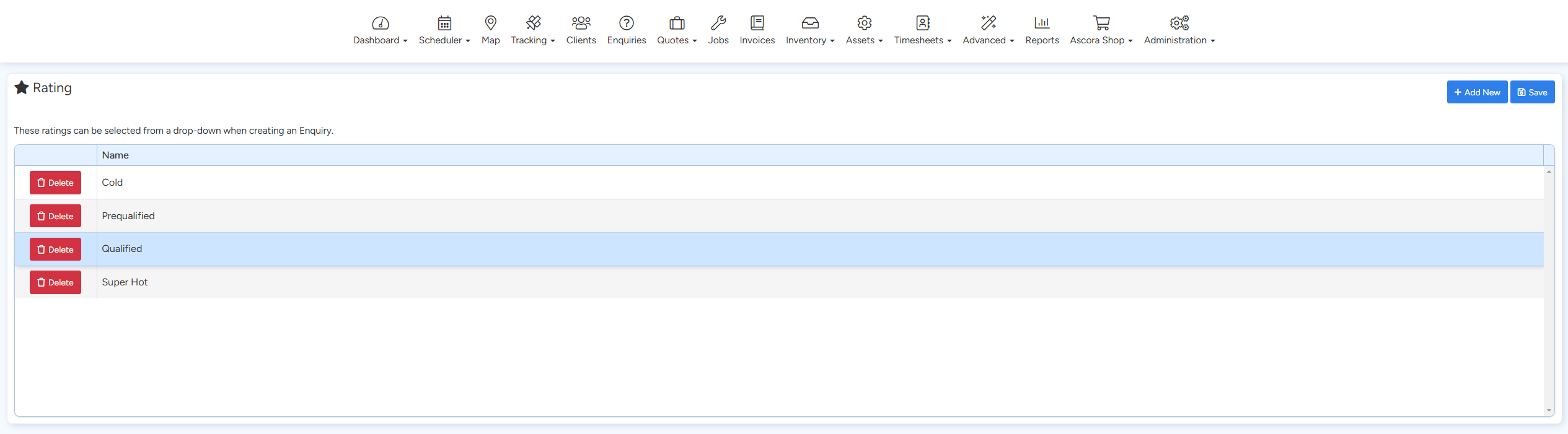
Example Ratings:
- Cold – The customer has shown interest but isn't ready to commit.
- Prequalified – The lead meets basic criteria but requires further evaluation.
- Qualified – The lead is a good fit and has expressed serious interest.
- Super Hot – The lead is highly engaged and ready to move forward.
How to Create Ratings in Ascora:
- Go to Administration → Sales.
- Locate the Ratings section.
- Click + Add New to create a new rating.
- Enter the name of the rating (e.g., "Cold," "Qualified").
- Click Save to finalize the new rating.
✅ Tip: Customize lead ratings to match your business process. If you have a longer sales cycle, consider adding stages like "Follow-up Required" or "Proposal Sent."
Applying Lead Ratings to Enquiries
Once you have created lead ratings, they can be applied to Enquiries in Ascora to help track and manage leads effectively.
- Go to Enquiries in the system.
- Select or create a new enquiry.
- Find the Rating dropdown.
- Choose the appropriate rating (Cold, Prequalified, etc.).
- Save the enquiry.
Expected Results:
Lead ratings will now be visible in your enquiry list, making it easier to filter and track high-priority leads.
Best Practices for Managing Leads in Ascora
- Review lead ratings regularly to ensure they are still relevant to your sales process.
- Use lead ratings to prioritize follow-ups—focus on "Qualified" and "Super Hot" leads first.
- Ensure your team understands the criteria for each rating to maintain consistency.
- Monitor conversion rates from each lead category to refine your sales strategy over time.

Got a question?
Submit an Idea 💡 Go to Ideas Portal