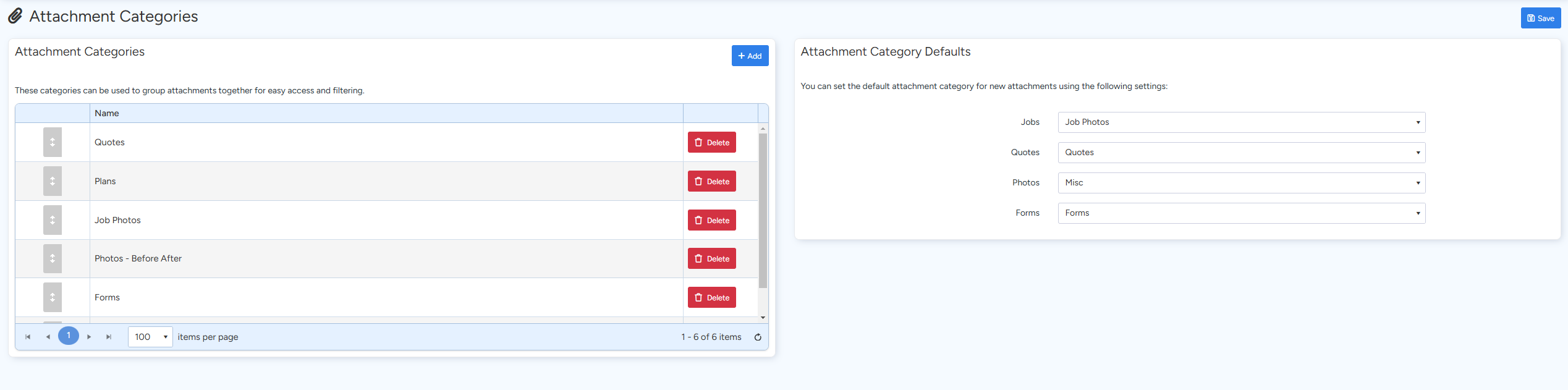
Attachment Categories allow you to group related attachments together, making it easier to access, filter, and manage your files across Jobs, Quotes, Invoices, and other documents. In this section, you can create new categories, edit existing ones, and even set a default category for new attachments. This helps maintain a clean and organized system, ensuring that all attachments are easy to locate and consistently categorized.
Below are the steps to set up and manage your attachment categories:
- Accessing Attachment Categories:
Navigate to the Administration section in Ascora and select Attachment Categories. Here you’ll see a list of existing categories.
- Creating a New Category:
Click + Add New. Enter a descriptive name and, if desired, a brief description to help identify the category’s purpose. Save your changes to add the new category.
- Editing or Deleting Categories:
To modify an existing category, click the Edit icon next to the category name, make your changes, and save. To delete a category, select the delete option and confirm the removal.
- Setting a Default Attachment Category:
In the settings for new attachments, you can choose a default category. This default will automatically be applied when new attachments are added, ensuring consistency across your documents.
Got a question?
Submit an Idea 💡 Go to Ideas Portal