Barcodes provide a fast and accurate way to manage equipment in Ascora, ensuring seamless tracking, easy access to service history, and efficient job completion. By assigning one or more barcodes to each piece of equipment, businesses can quickly scan, identify, and update service records—whether in the field or the office.
With barcode scanning, technicians can instantly access equipment details during a job, eliminating manual searches and reducing errors. If an equipment item isn’t already linked to a job, Ascora will prompt the user to add it—ensuring a streamlined workflow and comprehensive service tracking.
Leveraging barcodes means faster check-ins, more accurate record-keeping, and a more efficient maintenance process, keeping businesses organized and ahead of schedule.
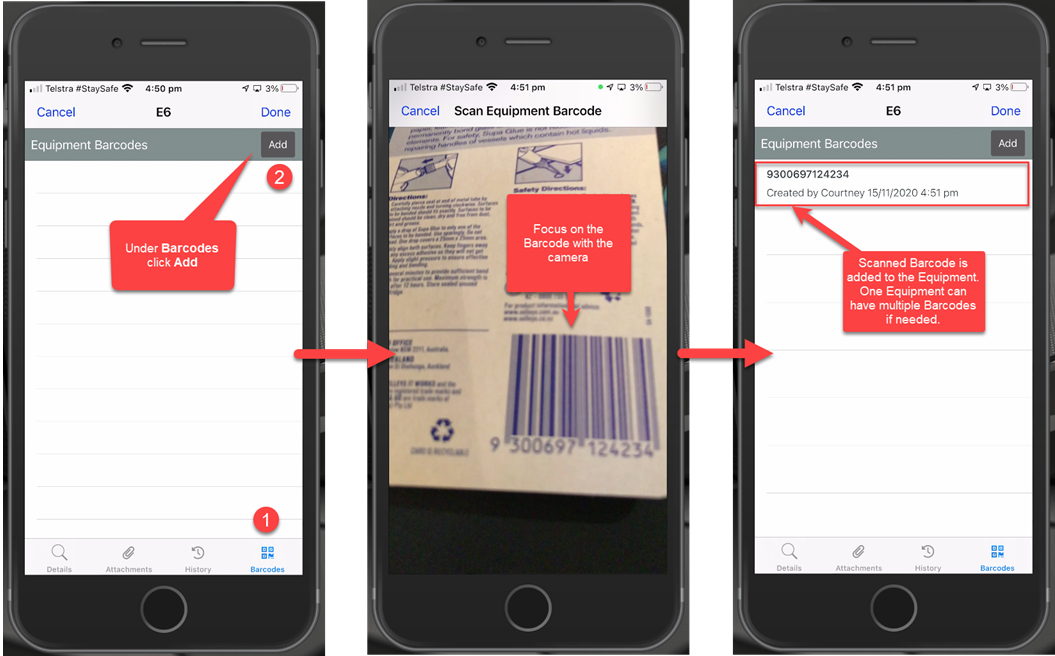
In Ascora you have the capability to add one or more barcodes to a piece of Equipment. The barcode can be in any of the standard formats- for example EAN13, UPC, QR Codes.
Under a Job you can scan a Barcode to then jump straight into the details of that piece of Equipment. If the Equipment does not already exist on the Job you will be prompted to add it. This enables you to walk up to a piece of Equipment, scan the code and view the related information and complete the service details.
Adding a Barcode to Equipment
Got a question?
Submit an Idea 💡 Go to Ideas Portal