Job statuses are either automatically updated depending on which event or activity occurred or manually updated by selecting the corresponding status box from the Job Screen.
The following table shows a list of job statuses and their status colours as well as trigger events.
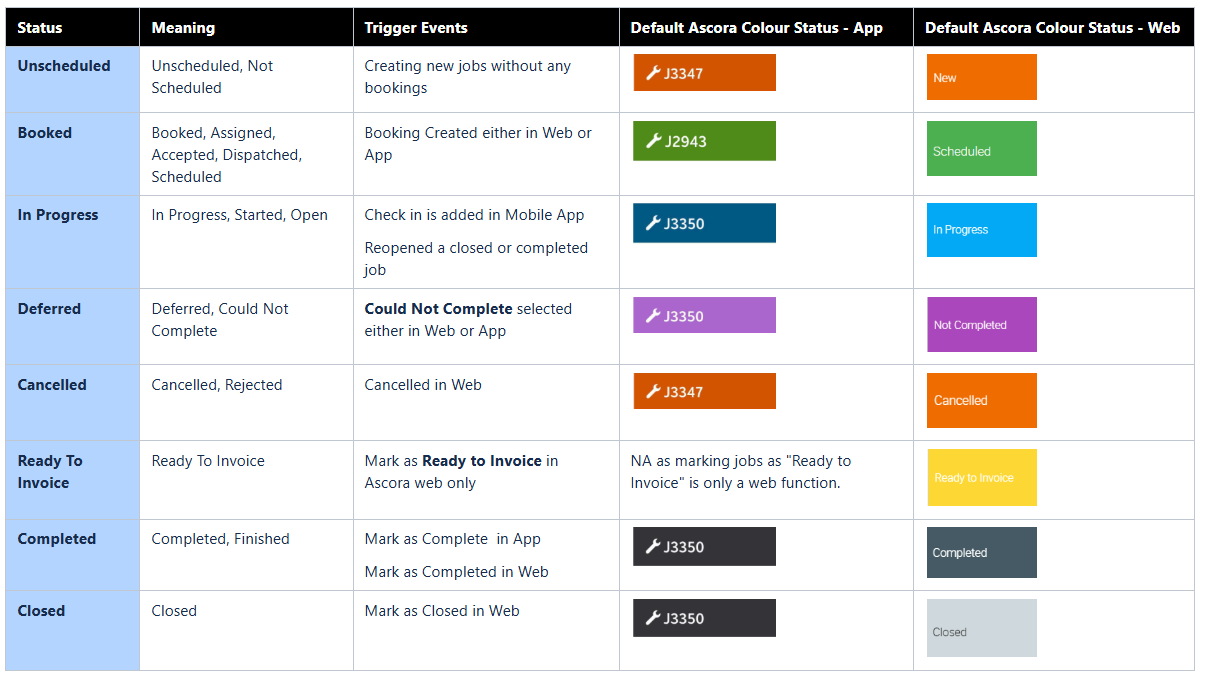
NOTE: There is a setting in Administration → Defaults → Set Schedule Colours Only By Status - if this is enabled, all your jobs and quotes will be colour coded according to default status colours which is standard across Ascora.
If you disable this setting, you can colour code your jobs and you can do it in Administration → Jobs → Edit → Choose Custom Colour.
The below image shows the default Ascora colours for quote and job statuses in the Scheduler area.

Note: If you created a job with a booking but can't see this on the app, please synchronise your phone to pull these data down from the web.
Got a question?
Submit an Idea 💡 Go to Ideas Portal