Defining Job Types in Ascora helps you standardize and streamline your workflow by automatically applying default descriptions, checklists, custom forms, and even color-coding for different categories of work. This not only ensures consistency across quotes and jobs but also saves time by reducing repetitive data entry. Whether you’re setting up a job for maintenance, installation, inspection, or any custom category, Ascora’s Job Types feature offers flexibility and clarity for your entire team.
By configuring Job Types, you can:
- Automate Default Checklists and Descriptions: Ensure your team follows the correct steps every time.
- Assign Custom Forms: Prompt required forms at check-in or completion for better compliance and record-keeping.
- Color-Code Job Types: Quickly identify job categories at a glance.
- Integrate with Accounting: Optionally link unique account codes for more precise financial tracking.
Use the steps below to set up new Job Types, customize default content, and enhance your overall job management experience in Ascora.
📽 Watch the video guide ⤵
📽 Job Types (Working with Job Types) video guide ⤵
1. Go to Administration → Jobs.
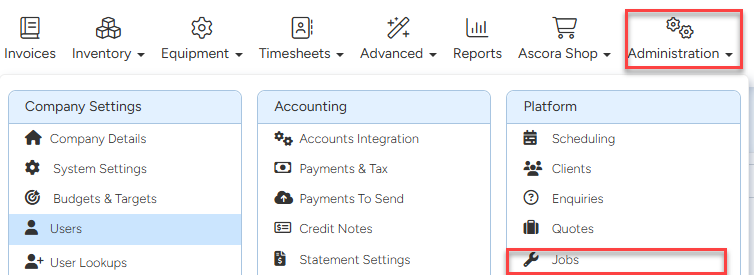
2. Click + Add New button in the Job Types section

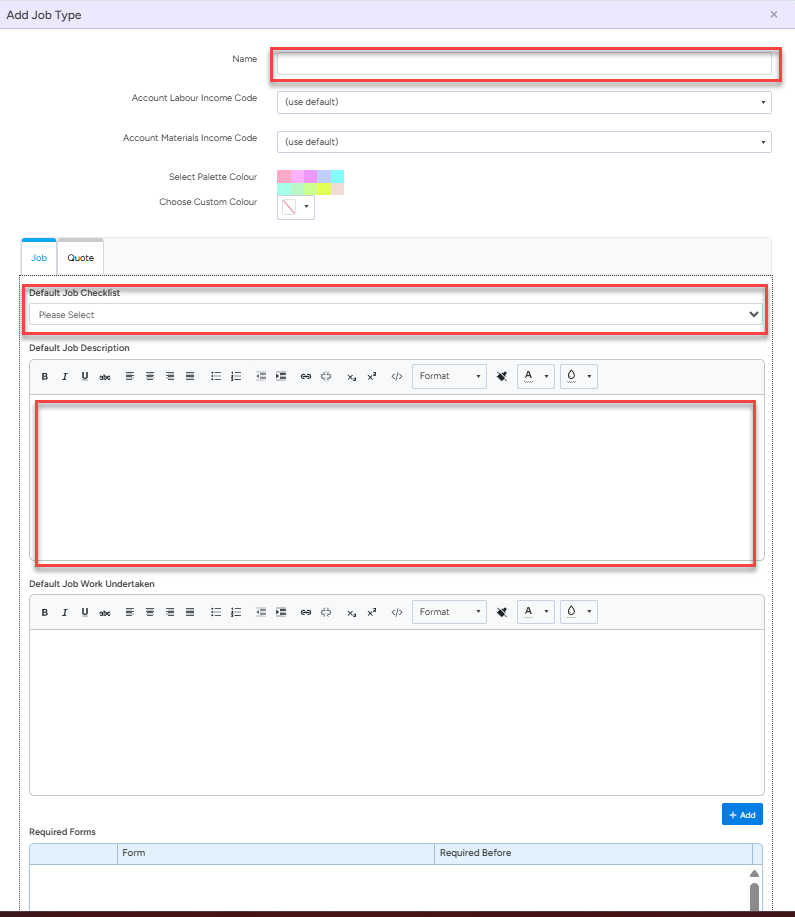
3. Enter the Job Type name, select the default checklist, and add a default description.
Once done with the configurations, click Save to proceed and when you create a job or a quote, you'll be able to select the job type that you've created.
Got a question?
Submit an Idea 💡 Go to Ideas Portal