Keeping your Terms & Conditions up to date is essential for clear communication with your clients. Ascora allows you to upload a PDF version of your Terms & Conditions, which can be included in quotes, invoices, and statements. By centralizing your Terms & Conditions in the Company Details section, you can easily update them without manually editing document templates.
Important Notes:
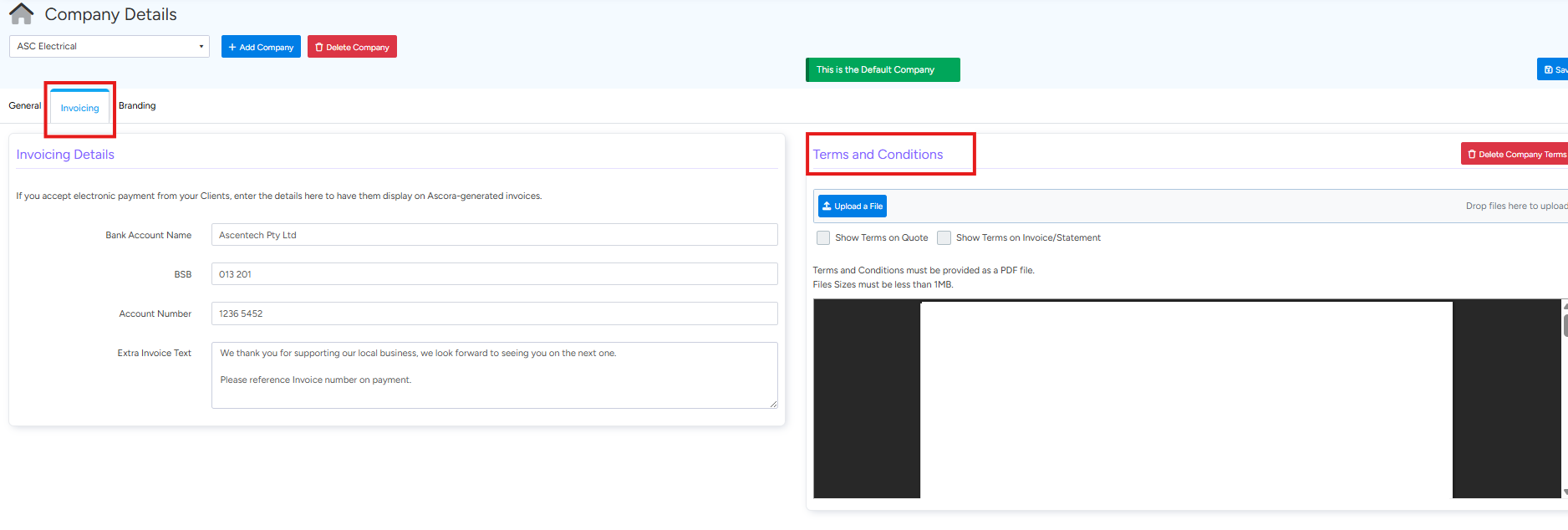
- The file must be in PDF format and under 1MB in size.
- You can choose whether to display Terms & Conditions on quotes, invoices, or statements.
The step-by-step guide below will walk you through how to upload and manage your Terms & Conditions in Ascora.
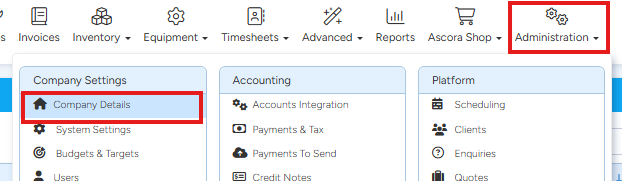
1. Go to Administration → Company Details.
2. Click on Invoicing, then on the right hand side, view terms and conditions
To access a tutorial video about the Company Details screen, you can click the link below:
Got a question?
Submit an Idea 💡 Go to Ideas Portal