Synchronisation is important as it allows the changes or updates made on mobile app such as job photos or job notes that is newly added to appear in Ascora web. It also forces the changes made in Ascora web to appear in mobile app such as updates made on a custom form, job details, etc.
📽 Watch the video guide ⤵
How to Sychronise data using iOS Mobile App
Synchronisation is important as it allows the changes or updates made on mobile app such as job photos or job notes to appear in Ascora web. It also forces the changes made in Ascora web to appear in mobile app.
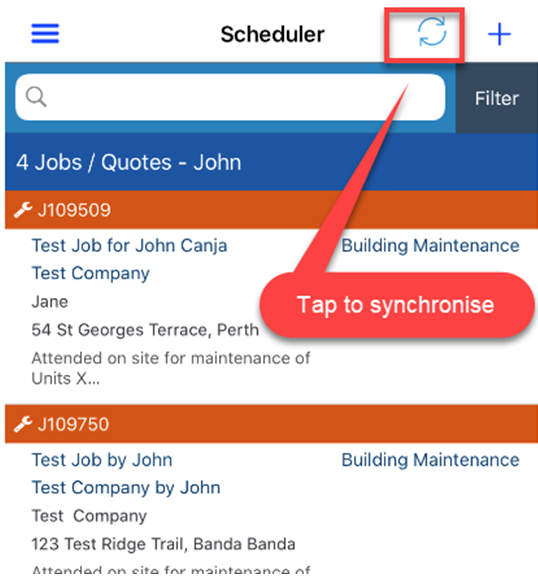
1. Tap the icon located on the left of the + icon. This will do synchronisation and a notification appears on the lower part of the screen “synchronisation started” and waits for it to show “synchronisation finished.”
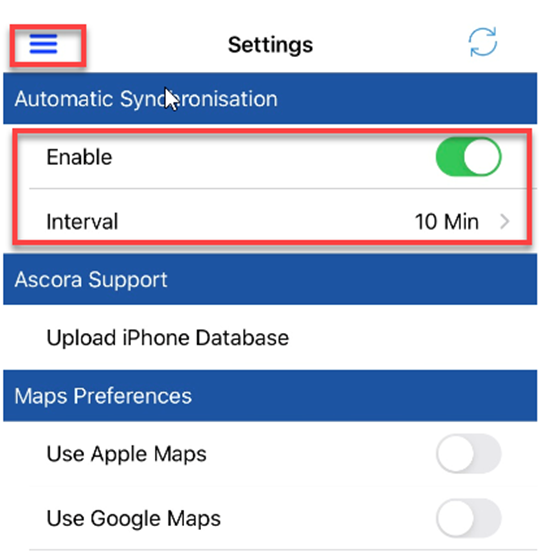
2. Alternatively, you can tap on the 3 lines on the upper left of the screen and select “Settings” and you can choose to enable automatic synchronisation or set specific interval.
Got a question?
Submit an Idea 💡 Go to Ideas Portal