Merging customers is sometimes necessary to clean up duplicate records or consolidate data under a single customer entry. In Ascora, you can quickly combine two customer records, transferring all associated quotes, jobs, and other details from the source customer to the destination customer. Keep in mind that the source customer record will be archived and cannot be restored once the merge is complete. However, any jobs and quotes from the source will remain accessible under the destination customer, ensuring you don’t lose important historical data.
Below are the steps to combine customers, along with important tips and considerations to keep in mind before proceeding.
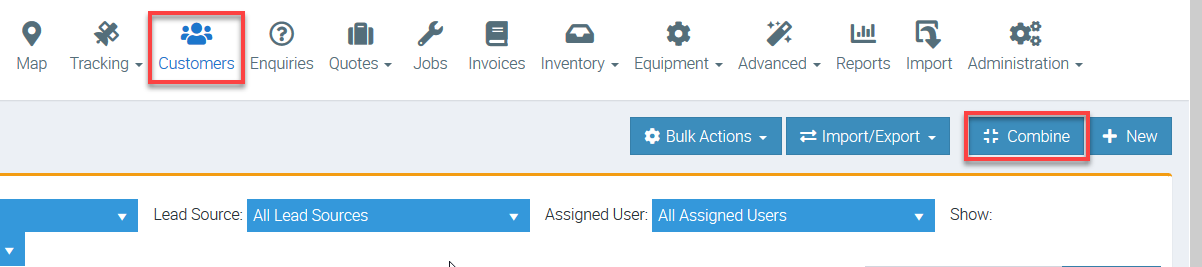
1. Go to Customers tab and click Combine.
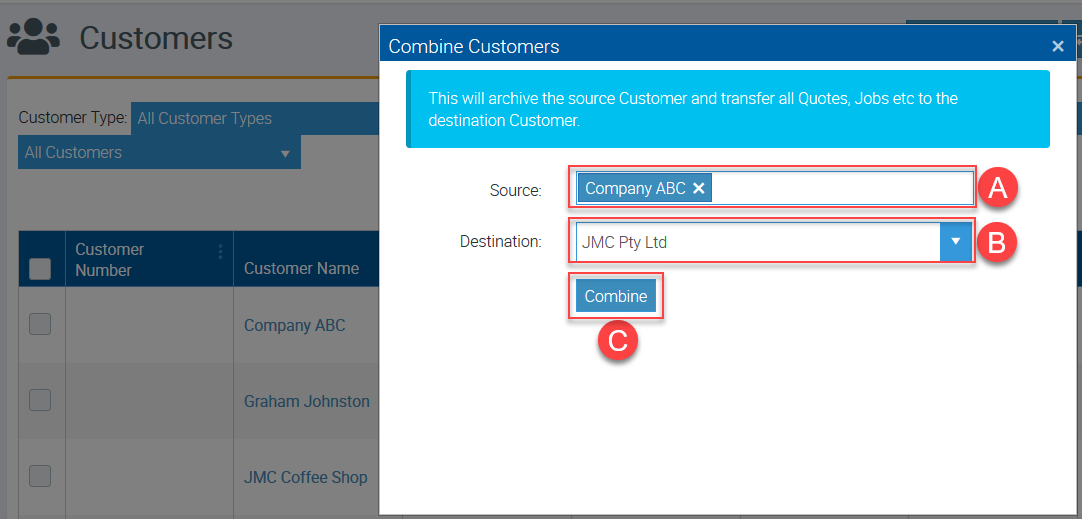
2. Select your source customer which is the one with jobs and quotes that you'd like to transfer then select your destination customer.
A. Click the box beside Source to select your source customer and in this example, we've selected Company ABC.
B. Click the little triangle beside Destination to select your destination customer or you can search the customer name from there and in this example, we've selected JMC Pty Ltd.
C. Click Combine once ready to proceed.
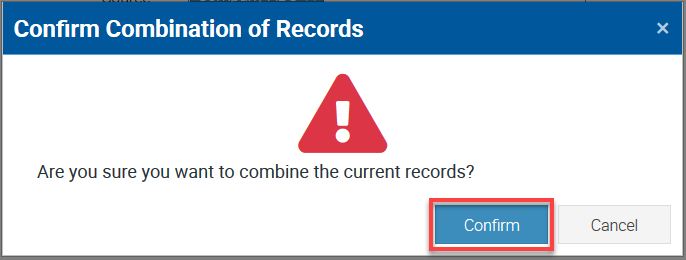
3. A box with a warning message appears and click Confirm to continue.
Got a question?
Submit an Idea 💡 Go to Ideas Portal