Proper inventory location management ensures accurate stock tracking and efficient supply allocation across different warehouses, vehicles, or storage areas. In Ascora, you can:
✔ Create and manage multiple inventory locations – Organize stock across different storage points.
✔ Set a default inventory location – Ensure stock is automatically allocated to the correct location for streamlined operations.
✔ Enhance job efficiency – Assign specific locations to track supply availability for mobile teams or warehouse storage.
This guide will walk you through the step-by-step process of adding new inventory locations and setting a default location, ensuring seamless inventory tracking and job allocation.
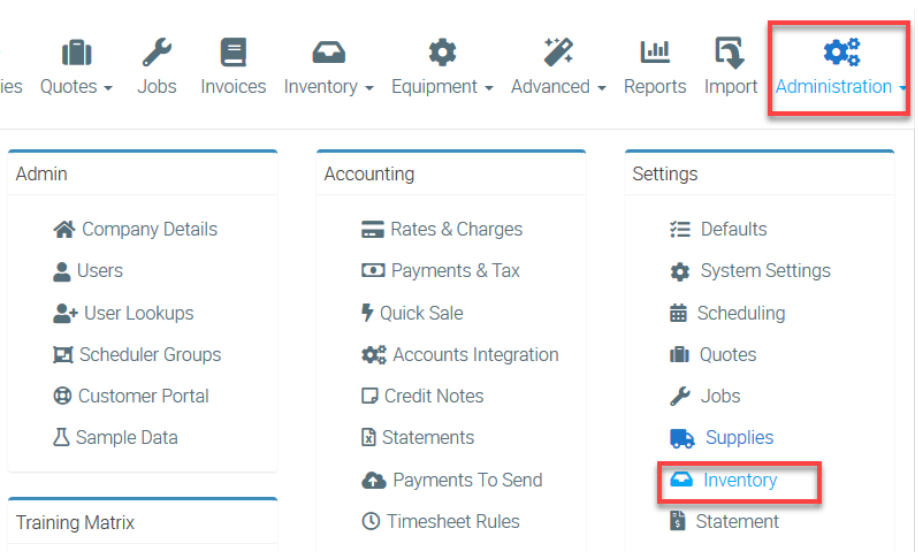
1. Go to Administration → Inventory.
2. Click Add New and enter the location name. In this example, we call it Default Warehouse.
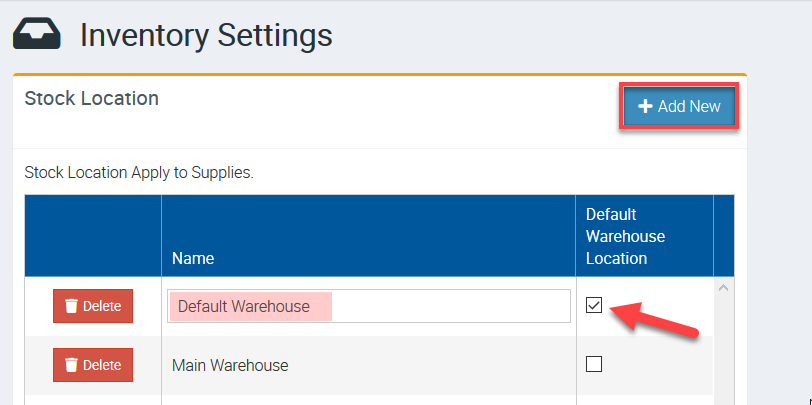
3. Once done, click Save button located at the upper right part of the page.

Got a question?
Submit an Idea 💡 Go to Ideas Portal