Teams in Ascora are a versatile tool designed to help you manage your workforce more effectively. Whether your business operates across different regions, specializes in various types of work, or has clearly defined departments, Teams enable you to organize users and jobs efficiently.
Why Use Teams?
- Business Segmentation: Separate your workforce into distinct units, such as Installation and Maintenance, for better focus and task allocation.
- Geographical Management: Organize teams by location, such as WA, QLD, or NSW, for businesses operating in multiple regions.
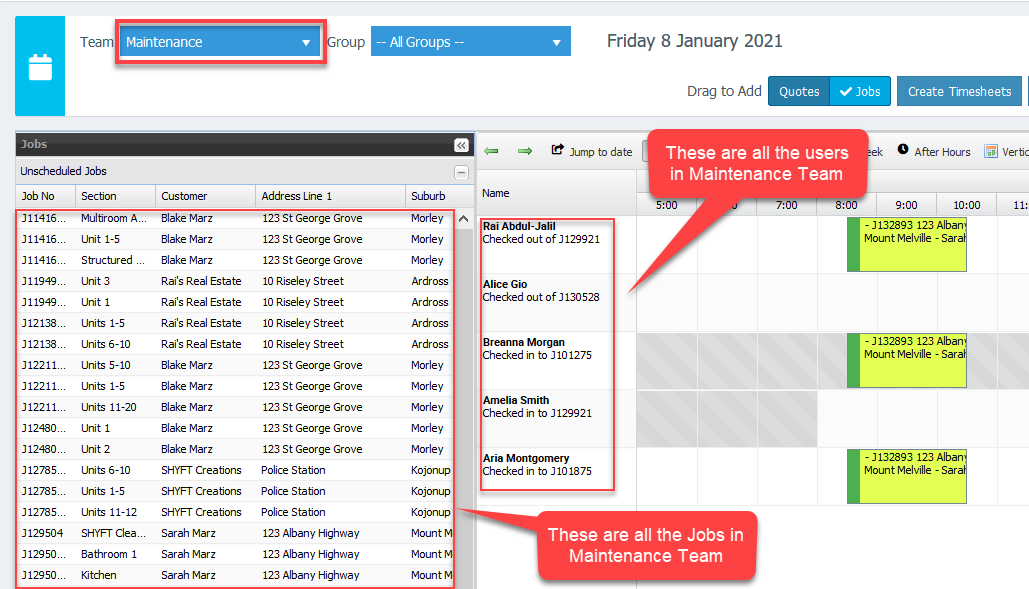
- Improved Filtering: In the Scheduler, filtering by Teams will display only the users and jobs assigned to that team, simplifying the scheduling process.
Important Key Details:
- Each user can belong to only one team, which can be assigned or updated under Administration → Users by selecting the desired user and assigning them to a team.
- When filtered by a specific team in the Scheduler, it displays both the relevant users and their associated jobs, offering a consolidated view for team-specific management.
For example, filtering by a "Maintenance" team will display all jobs and technicians assigned to that team, providing clarity and structure.
Default Team Settings
When you have a user without an assigned team, you can configure which team will be assigned as default to that user.
Go to Administration → Defaults and on the right panel, look for Jobs settings area and select your Team ID.
