Managing and editing timesheets effectively ensures accurate payroll processing, job costing, and labor tracking. Ascora provides a flexible and intuitive way to modify timesheet entries, whether you're making adjustments for a specific job or reviewing timesheets for an entire pay period.
With Timesheet Editing, users can modify work hours, update check-in types, adjust meal breaks, apply labor roles, and even include allowances—all from the Job Screen or the Reports Area. The Reports Area is ideal for making bulk edits or reviewing a specific timeframe, while the Job Screen allows for job-specific adjustments, ensuring that labor hours and costs align accurately with project budgets.
By leveraging these tools, businesses can streamline payroll accuracy, reduce administrative overhead, and maintain a transparent record of labor costs. Learn how to make precise adjustments to timesheets and ensure your workforce data remains reliable and up to date.
📽 Watch the video guide ⤵
Editing via the Reports Area
1. To edit timesheet, go to Reports -> Timesheet Editing.

2. Select a date range for the timesheets and you can also select a particular User to filter back the timesheet records displayed further. Find the timesheet to be modified and click Edit.

3. A new screen appears where you can see details such as Start Time and End Time that you can override or edit. After making the changes, click Save.
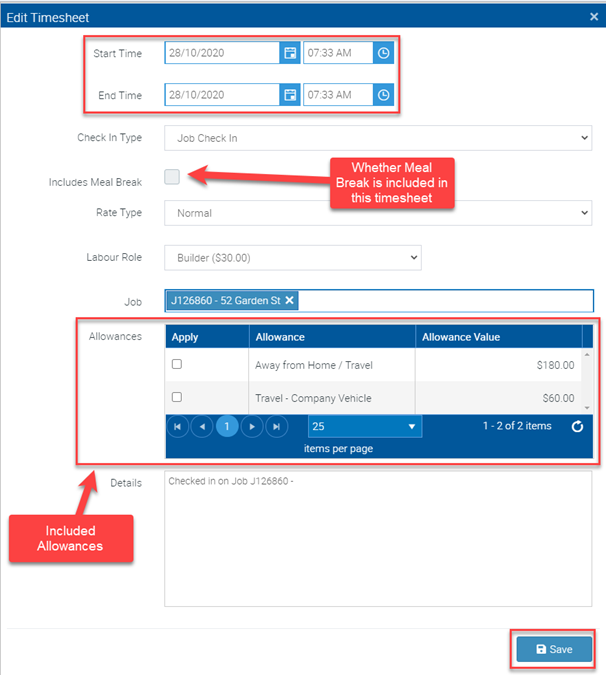
You can also edit and adjust:
- Meal Break – whether the standard meal break time is subtracted from the total time. The standard meal break can be set under Administration à Defaults à Break Time.
- Check In Type – if the Time is allocated to a Job, Travel, Quotation or a General Time entry.
- Rate Type – set whether the rate is normal, time and a half, double time etc. The related Cost for these rates is set under the User.
- Labour Role – the Labour Role that is generated from the Time Entry.
- Allowances – if any allowances are included in this Timesheet.
- Details – the general notes on what was achieved in the time entry.
- Editing the Timesheet will also recalculate the related Labour on the Job.
- If you change the Job from one to another the Labour will be recalculated on both Jobs.
Got a question?
Submit an Idea 💡 Go to Ideas Portal