Timesheet Rules in Ascora automate labor rate adjustments based on predefined conditions, ensuring accurate payroll calculations and compliance with penalty rates. These rules apply exclusively to timesheets created in the Ascora mobile app and allow businesses to streamline labor cost management.
With Timesheet Rules, you can:
✔ Automatically Apply Overtime Rates – Configure time-and-a-half, double time, and double time-and-a-half rates.
✔ Set Custom Time Thresholds – Adjust rates based on start times, total hours worked, or specific daily cutoffs.
✔ Prevent Manual Calculation Errors – Ensure timesheets reflect accurate labor costs for payroll and job profitability analysis.
✔ Sync Between Mobile & Web – Mobile timesheets automatically update and recalculate in Ascora Web, providing real-time consistency.
By implementing these rules, businesses can eliminate manual adjustments, reduce payroll discrepancies, and maintain compliance with award rates.
📽 Watch the video guide ⤵
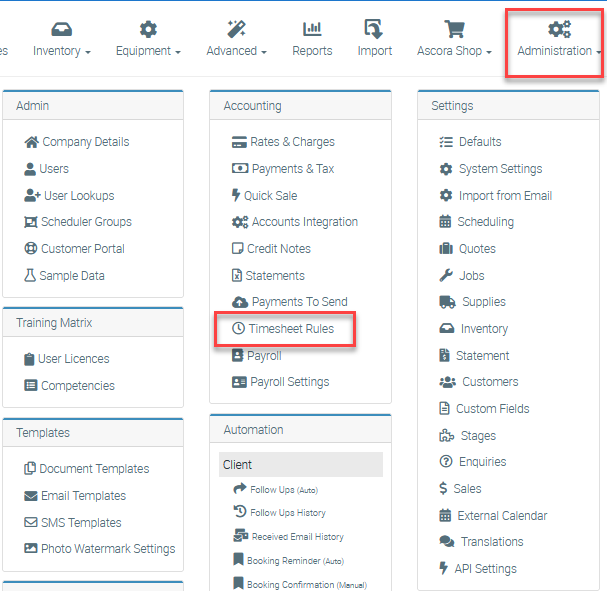
1. To enable Timesheet Rules, go to Administration → Timesheet Rules.
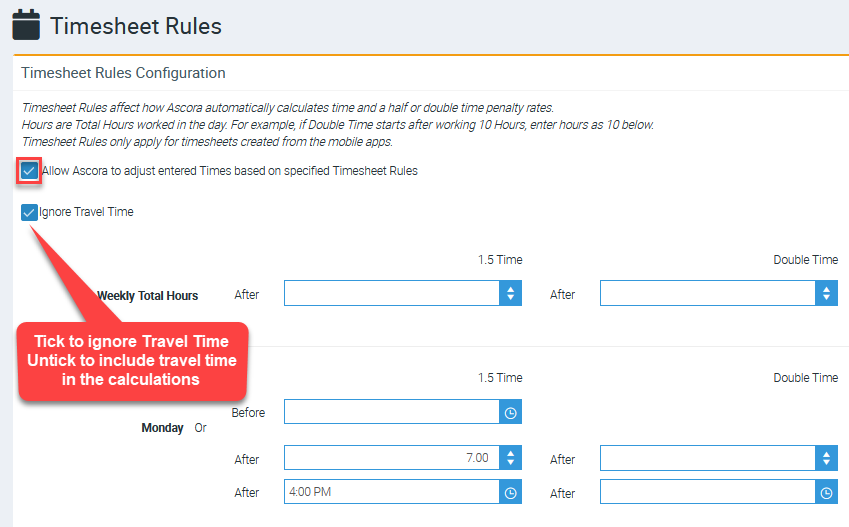
2. Tick the box beside “Allow Ascora to adjust entered Times based on specified Timesheet Rules.”
Rates that can be applied through Timesheets
There are four rates than can be applied through timesheet rules:
- 1x (Normal – by default)
- 5x (Time and a Half)
- 2x (Double Time)
- 5x (Double Time and a Half).
If Timesheet Rules have not been configured or a Timesheet does not match configured criteria, it will remain as Normal rate (or the rate specified on the created Timesheet).
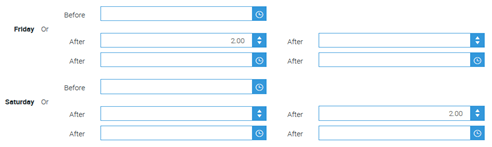
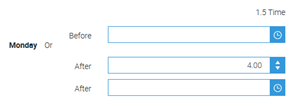
For each day, there are three different rules that can be applied:
- Before Specified Time (Only applies to 1.5x rate)
- After Specified Hours
- After Specified Time
A combination of After Specified Hours and After Specified Time can be applied, however, the earliest Rule to be applied will override the other.
For example, if a Timesheet for 7:00AM – 12:00PM was processed with the 1.5x After Specified Hours setting of 4 and the 1.5x After Specified Time setting of 8:00AM, the result would be a timesheet for 7:00AM – 8:00AM at Normal rate and a timesheet for 8:00 AM – 12:00PM at 1.5x rate.
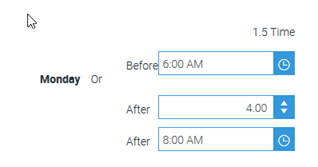
| INPUT | OUTPUT | ||||||||||
|---|---|---|---|---|---|---|---|---|---|---|---|
| Timesheet 1 (5 hours) | Timesheet 1 (1 hour) | Timesheet 2 (4 hours) | |||||||||
| Start Time | End Time | Rate | Meal Break | Start Time | End Time | Rate | Meal Break | Start Time | End Time | Rate | Meal Break |
| 07:00 AM | 12:00 PM | 1x | N/A | 07:00 AM | 08:00 AM | 1x | N/A | 08:00 AM | 12:00 PM | 1.5x | N/A |
Additionally, if two rates overlap, the higher rate will be applied.
For example, if a Timesheet for 7:00AM – 12:00PM was processed with the 1.5x After Specified Hours setting of 4 and the 2x After Specified Hours setting of 2, the result would be a timesheet for 7:00AM – 9:00AM at Normal rate and a timesheet for 9:00 AM – 12:00PM at 2x rate.
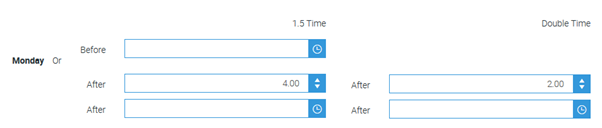
| INPUT | OUTPUT | ||||||||||
|---|---|---|---|---|---|---|---|---|---|---|---|
| Timesheet 1 (5 hours) | Timesheet 1 (2 hours) | Timesheet 2 (3 hours) | |||||||||
| Start Time | End Time | Rate | Meal Break | Start Time | End Time | Rate | Meal Break | Start Time | End Time | Rate | Meal Break |
| 07:00 AM | 12:00 PM | 1x | N/A | 07:00 AM | 09:00 AM | 1x | N/A | 09:00 AM | 12:00 PM | 2x | N/A |
For timesheets that go over a day, only the Timesheet Rules for the day the timesheet started on will be applied.
| INPUT | OUTPUT | ||||||||||
|---|---|---|---|---|---|---|---|---|---|---|---|
| Timesheet 1 (5 hours) | Timesheet 1 (2 hours) | Timesheet 2 (3 hours) | |||||||||
| Start Time | End Time | Rate | Meal Break | Start Time | End Time | Rate | Meal Break | Start Time | End Time | Rate | Meal Break |
| 11:00 PM | 04:00 AM | 1x | N/A | 11:00 PM | 01:00 AM | 1x | N/A | 01:00 AM | 04:00 AM | 1.5x | N/A |
Meal Break
When the processed timesheet has a meal break applied, the meal break will be listed against the normal timesheet.
| INPUT | OUTPUT | ||||||||||
|---|---|---|---|---|---|---|---|---|---|---|---|
| Timesheet 1 (7.5 hours) | Timesheet 1 (4 hours) | Timesheet 2 (3.5 hours) | |||||||||
| Start Time | End Time | Rate | Meal Break | Start Time | End Time | Rate | Meal Break | Start Time | End Time | Rate | Meal Break |
| 08:00 AM | 04:00 PM | 1x | 0.5 hr | 08:00 AM | 12:30 PM | 1x | 0.5hr | 12:30 PM | 04:00 PM | 1.5x | N/A |
Timesheet added in iOS App and showing in Ascora Web with Timesheet Rules enabled
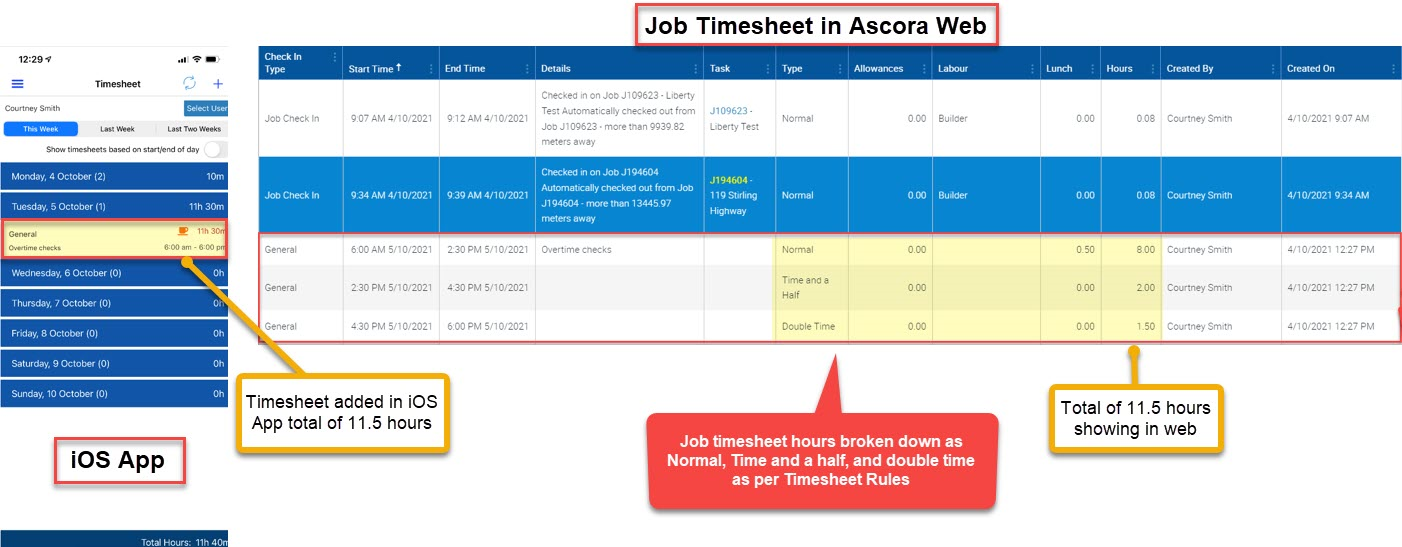
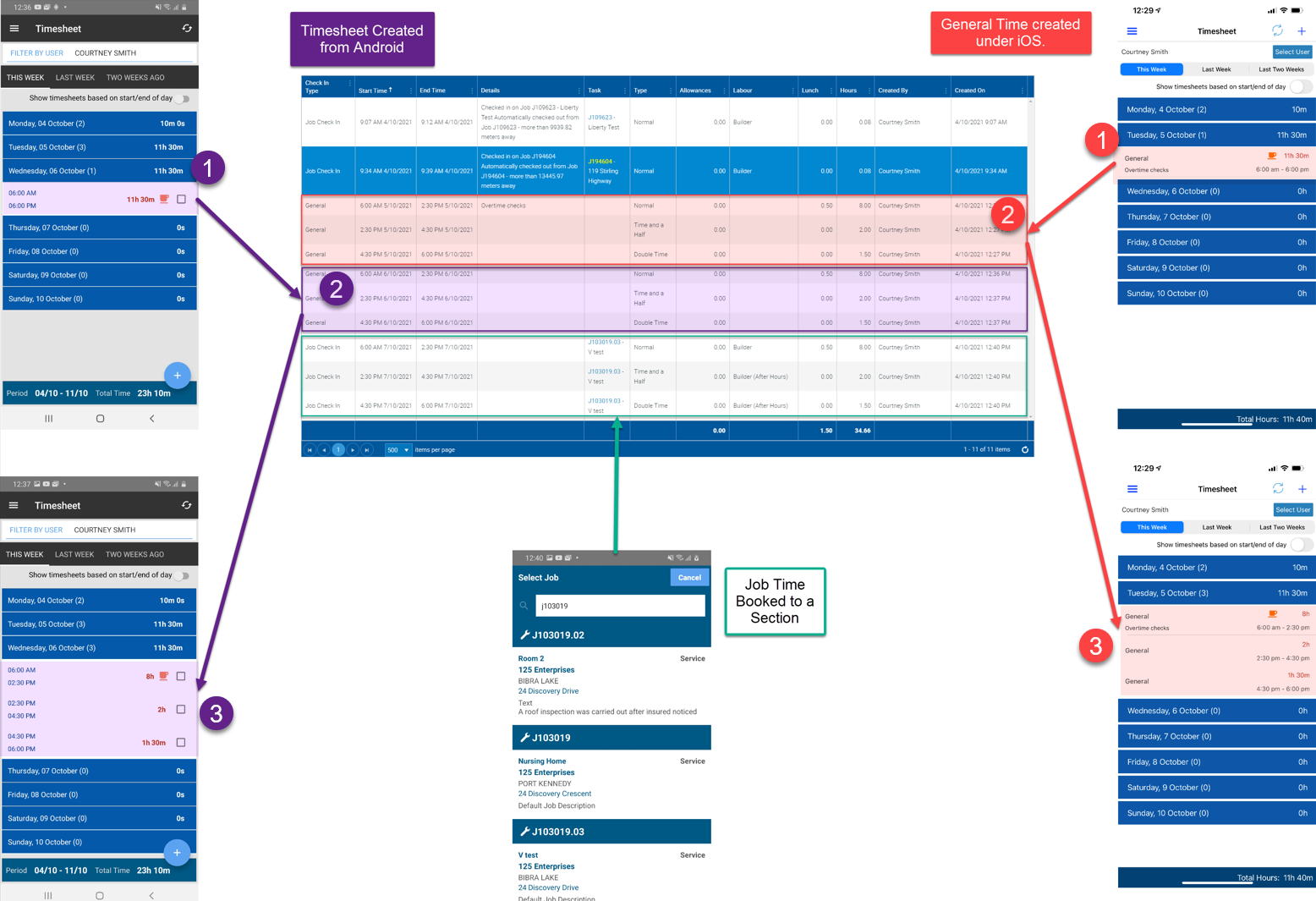
1. The following image is an example of timesheet hours added in iOS App total of 11.5 hours and shown in Ascora web as Normal, Time and a Half, and Double time as per Timesheet Rules applied.
2. After timesheet rules are applied automatically, the updated timesheet calculation will be synched down to the iOS App to reflect the exact breakdown shown in web such as how much hours is general, Time and a Half, and Double Time.
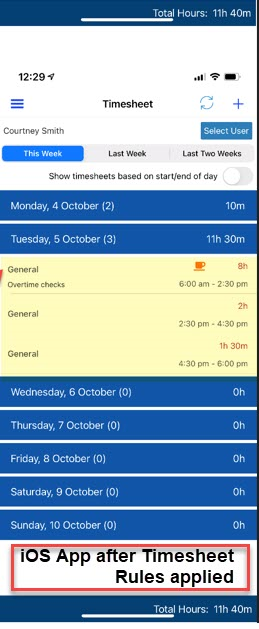
Refer to the image below showing timesheets created in iOS and Android app
1. Timesheet Hours added on the app
2. Timesheet Hours recalculated in web with timesheet rules applied
3. Recalculated hours are pushed down to the app for consistency
Got a question?
Submit an Idea 💡 Go to Ideas Portal