Customer Job History keeps building in the mobile app as jobs get completed but it's important to note that when you uninstall and reinstall the app, not all job history is retrieved after reinstalling the app.
Customer Job History is definitely accessible in Ascora web but should there be instances when you need to go back further and retrieve older job history for a certain customer, you can use the Request History tab in iOS app.
Follow the steps below to retrieve customer job history in iOS App.
1. Log into your iOS App and go to Customer List.
2. Open the customer details and press on Menu and select Request History.
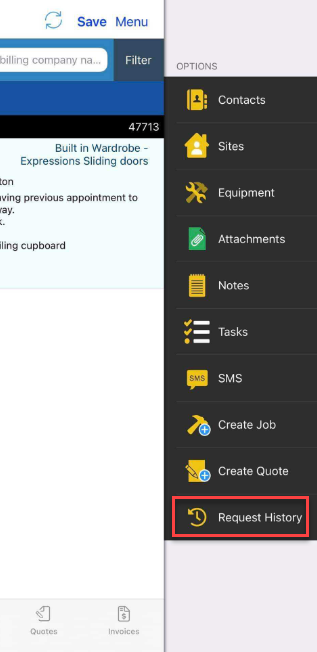
Depending on the amount of data being retrieved, it could take a few seconds or a couple of minutes and once completed, you can navigate to Jobs tab to see the retrieved data.
Got a question?
Submit an Idea 💡 Go to Ideas Portal