Keeping track of your customers efficiently is essential for smooth operations. Ascora’s Customer List provides multiple ways to locate, view, and edit your customers, ensuring you can quickly find the information you need. Whether you’re filtering by Customer Type, Lead Source, or using the Global Search box, Ascora offers flexible methods to refine your results and streamline daily tasks.
In this guide, you’ll learn how to:
- View Customer Details and make updates directly from the Customer List.
- Filter by Customer Type or Lead Source to narrow down groups of similar customers.
- Use the Global Search to find specific customers by name, address, or any relevant keyword.
Follow the steps below to master Ascora’s searching and filtering tools, and effortlessly stay on top of your customer data.
Choose the Customers Icon in the Top Menu to display the Customer List.

View a Customer's Details
- In the Customer List, locate the customer you want to update or review.
- Click View next to the customer’s name to open and edit their full profile.

Tip: From the Customer Details screen, you can modify addresses, add contacts, and access additional tabs for sites or billing.
Filter by Customer Type or Lead Source
- Use the dropdown menus to filter the Customer List by a specific Customer Type or Lead Source.
- This method is ideal for segmenting and managing groups of customers—like those generated by a particular marketing channel or classified into a certain category.

Best Practice: Consistently label customers with the correct type or lead source to take full advantage of these filters and streamline reporting.
Search Using the Global Search Box
- Enter any relevant keyword (e.g., name, suburb, or company) in the Global Search field.
- As you type, the Customer List narrows to match your input. For instance, typing “Fre” will display only those customers with “Fre” in their details (like “Fremantle”).
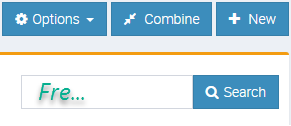
Pro Tip: This real-time search functionality allows you to locate specific records quickly, even if you only remember partial details such as a street name or suburb.
Got a question?
Submit an Idea 💡 Go to Ideas Portal